What is Genie AI?
Short answer
Genie AI is an assistant inside the player that answers viewer questions about the video. It answers only from the video’s transcript and the supplemental information you add. If those do not contain the answer, it says so instead of guessing. Genie AI is on Core and higher plans.
How to do it
Copy link to How to do it- Make sure the video has a transcript. Open the Transcript tab to check.
- Open the Genie AI tab and turn on the switch. The switch appears only when the video has a transcript.
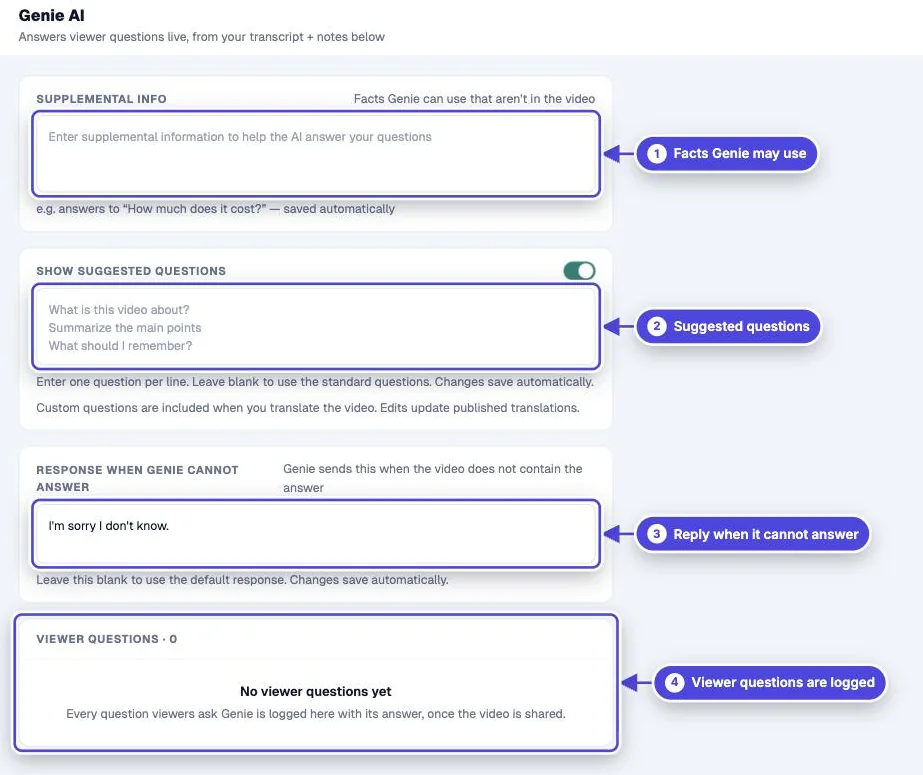
- Under Supplemental Info, add facts that are not in the video, such as prices or contact details.
- To guide viewers, turn on Show suggested questions and enter Suggested questions, one per line.
- Optional: enter a Response when Genie cannot answer.
- Optional: add a button with the Open Genie AI click action to invite questions at a set point.
- Click Preview and ask a question that the video answers and one that it does not.
How Genie answers
Copy link to How Genie answersGenie sends the viewer’s question, the transcript, and your supplemental information to an AI model, with instructions to use only those sources. Answers are short. When a viewer watches in a language other than English, Genie answers in the language of their question.
Read what viewers ask
Copy link to Read what viewers askThe Genie AI tab lists every question under Viewer Questions with Genie’s answer. Filter to Unanswered to see what the video and your notes do not cover, and use Download to save the list as a CSV. Add the missing facts to Supplemental Info, or cover them in the next version of the video.
Voice
Copy link to VoiceTurn on Speak Genie answers aloud in the video’s Settings to have Genie read its answers with an AI voice.
Where viewers find Genie
Copy link to Where viewers find Genie- The Genie button in the player controls, which the Genie AI switch turns on.
- Any interaction with the Open Genie AI click action.
- Genie needs an internet connection, so it is not available in offline packages.
Genie is not Ask ChatGPT
Copy link to Genie is not Ask ChatGPTThe Ask ChatGPT action answers a prompt you write and is not limited to your video. Genie stays within the transcript and your notes.