How do passing scores and retries work in a video quiz?
Short answer
Mindstamp scores each view as the percent of scored questions answered correctly. Two video settings decide the rule: Questions in score and Answer that counts. There is no single pass mark for the video. You set a minimum score where it matters: on a certificate, on completion emails, or on the completion report. Learners retry a question with Repeat Until Correct, and every attempt is recorded.
How to do it
Copy link to How to do it- Open the video and select Interactions. For each question, set the correct answer.
- Select Settings. Under Viewer experience, choose Questions in score and Answer that counts.
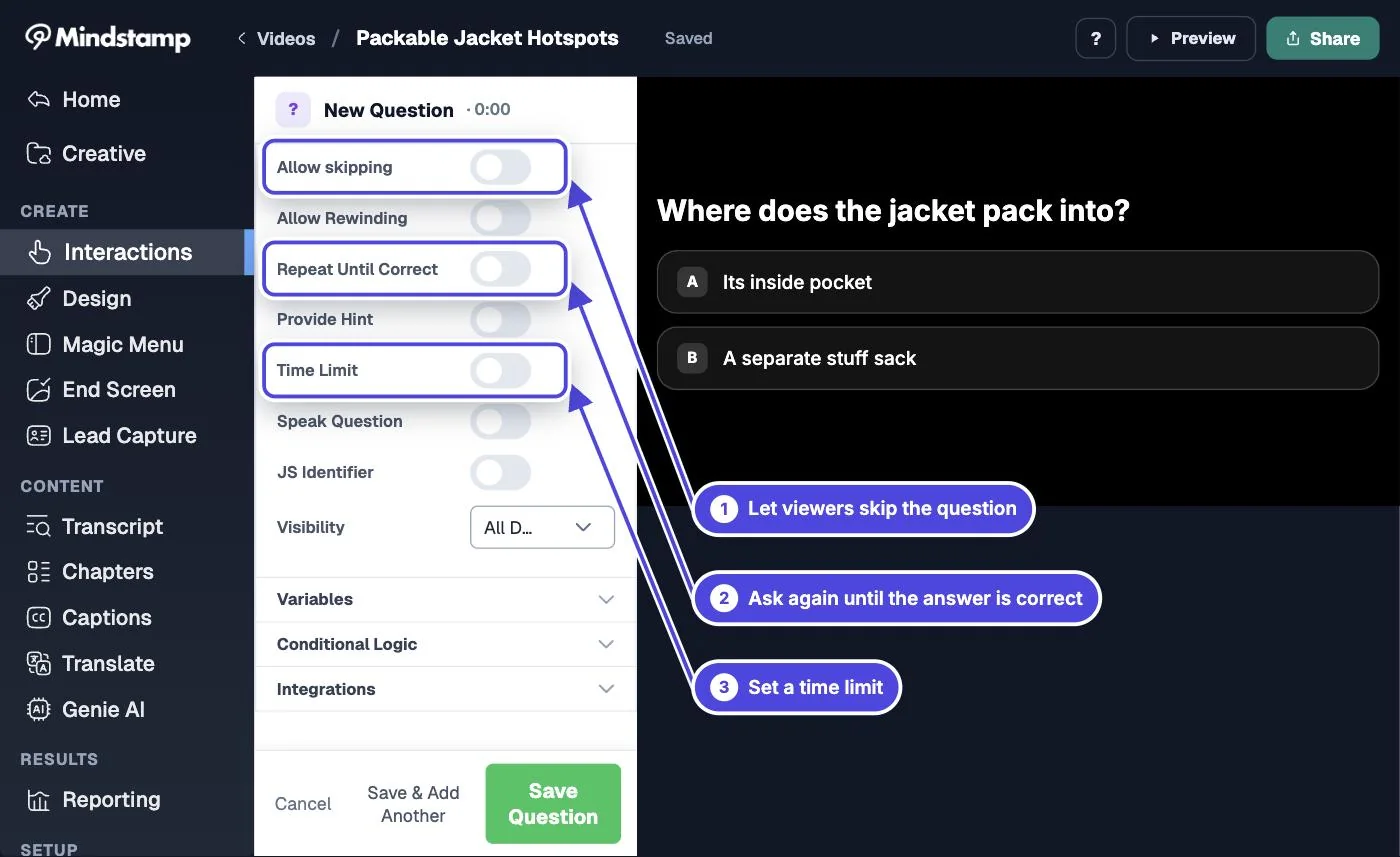
- To let learners retry a question, turn on Repeat Until Correct in that question's settings. Allow skipping and Time limit must be off.
- Keep Show Correctness on in the question design. Repeat Until Correct needs it.
- Set the pass mark where you use it: Require passing score on a certificate, Minimum score on completion emails, or Minimum score on the completion report.
- Test as a learner. Answer one question wrong, then right. The player shows Try Again after the wrong answer, and the report shows both attempts.
How the score is calculated
Copy link to How the score is calculated- A scored question has a correct answer set and is not hidden. Only these types can have a correct answer: free response, multiple choice, choose all that apply, dropdown, number and date.
- Questions in score > All questions: every scored question counts, except conditional questions. A question the learner did not answer counts as wrong.
- Questions in score > Answered questions only: only the questions the learner answered count, conditional questions included.
- New videos use All questions. Videos made before the setting was added keep Answered questions only until you change it.
- Answer that counts: First answer (the default) or Most recent answer. It matters when a learner answers a question more than once. If every scored question uses Repeat Until Correct, Most recent answer gives every learner who finishes a score of 100%.
- Choose all that apply is scored as an exact match. Missing or extra selections make the answer incorrect. There is no partial credit.
- The same score shows in the CORRECTNESS column of reports, in the cScore variable, in a SCORM package, and in the score rules for certificates, completion emails and the completion report.
Retry options
Copy link to Retry options- Repeat Until Correct: after a wrong answer, the learner sees Try Again and answers the same question again. The correct answer is not shown. There is no limit on attempts.
- Answer actions: send a wrong answer to an earlier point with Change Time, so the learner watches the lesson again and meets the question again.
- Watch again: the learner can start a new view. On the completion report, choose Best score, Latest completed view or First completed view to pick which attempt counts.
- There is no setting to limit a question to a fixed number of attempts.
Pass or fail paths in the video
Copy link to Pass or fail paths in the videoThe player keeps the running score in the cScore variable. On Pro and higher plans, conditional logic can use it to show a different ending, or send a learner back, when the score is below your pass mark.