Can I use YouTube videos in Mindstamp?
Short answer
Yes, but only for testing. You can paste a YouTube link to try an idea, but YouTube is not supported for production use. Before you publish, upload the file to Mindstamp or use another supported source, then replace the YouTube source so your interactions stay.
How to do it
Copy link to How to do it- Select New video, then select YouTube under Source.
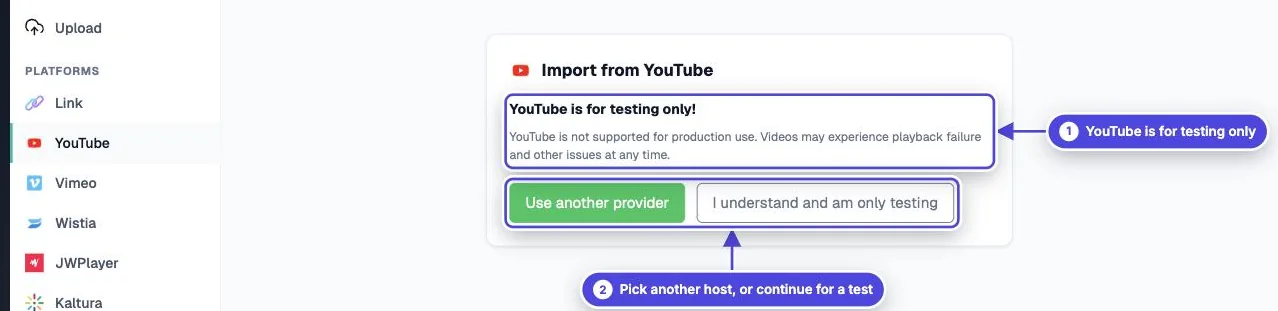
- Read the YouTube is for testing only! notice. To continue, select I understand and am only testing. To stop, select Use another provider.
- Paste the direct link to your YouTube video and create the video.
- Add interactions and test the idea with your team.
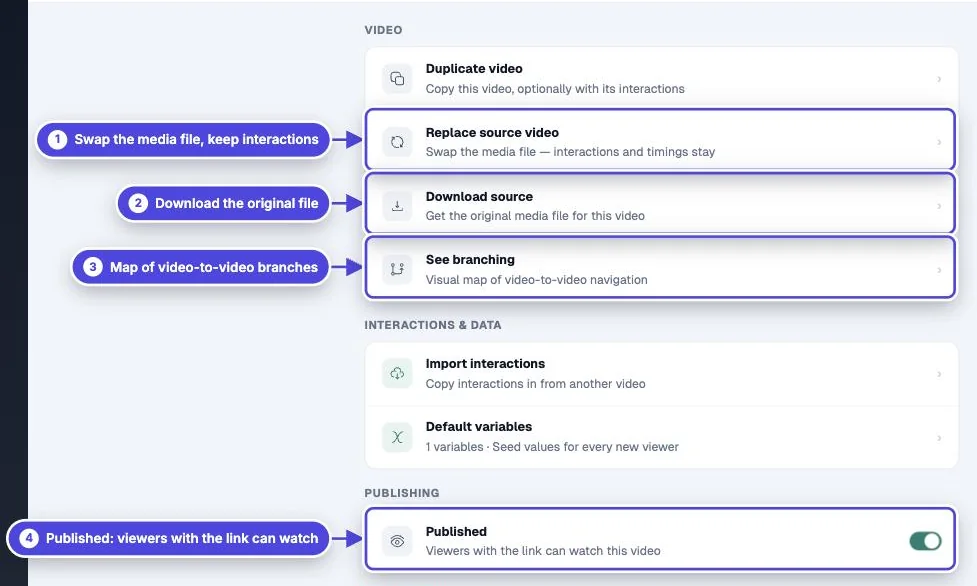
- Before you publish, open the video, go to More and select Replace source video. Upload the original file or link another supported source.
- Preview the video again and check that each interaction is still at the correct time.
Why YouTube is for testing only
Copy link to Why YouTube is for testing onlyThe app states that YouTube videos may have playback failures and other issues at any time. Mindstamp does not control how YouTube delivers its video, so a video that plays today can stop playing for your viewers without warning.
Use YouTube to check that interactive video fits your content. Do not send a YouTube-based video to customers, learners or prospects.
Move a test to production without rebuilding it
Copy link to Move a test to production without rebuilding itReplace source video keeps your interactions, timings, design, settings, share link and embed code. You do not need to rebuild the video. Read how to replace the video file for the checks to do after the change.
Use the original file that you uploaded to YouTube. Upload it to Mindstamp, or link it from Vimeo, Wistia or another supported host.
Features that need another source
Copy link to Features that need another source- Transcripts work only for uploaded videos and MP4 links, so a YouTube-based video cannot have a transcript.
- Download source is not available for a YouTube-based video.
Send viewers to your YouTube channel
Copy link to Send viewers to your YouTube channelTo link to YouTube from a Mindstamp video, you do not need a YouTube source. Add a button that opens your channel. See how to add a YouTube subscribe button.