How do I remove Mindstamp branding from my videos?
Short answer
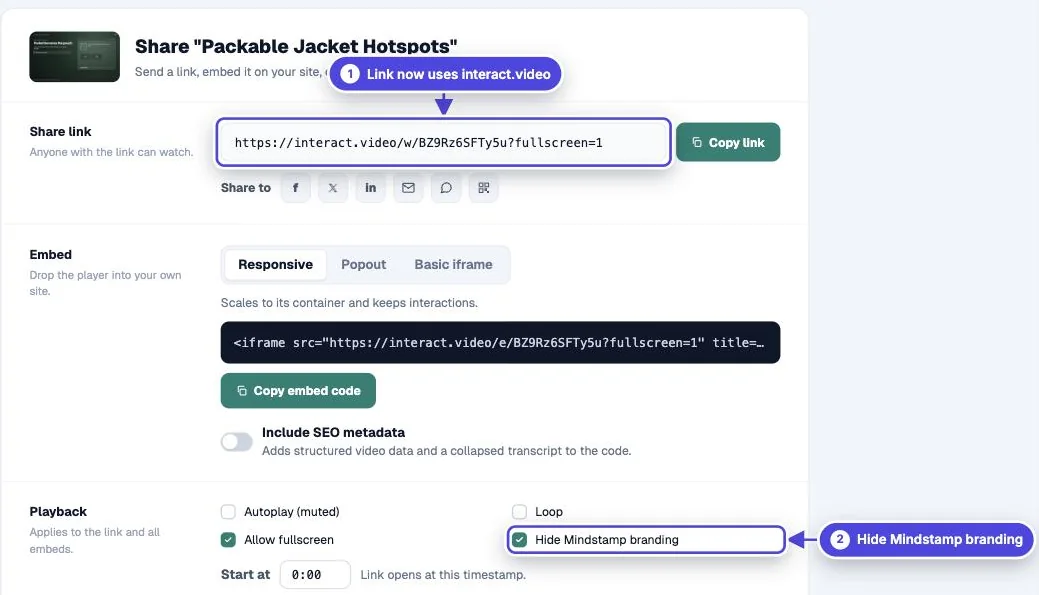
On Core and higher plans, open the video's Share page and select Hide Mindstamp branding under Playback. Your link and embed code then use a neutral interact.video address instead of a Mindstamp address. Pro and higher plans can also serve links from your own domain.
How to do it
Copy link to How to do it- Open the video and select Share.
- Under Playback, select Hide Mindstamp branding.
- Copy the link or embed code again. The address changes to interact.video.
- Replace any Mindstamp link or embed you already shared with the new one.
- Test: open the new link in a private browser window. Expected result: the address bar shows interact.video and the video plays.

What each plan includes
Copy link to What each plan includes- Every plan: your logo, colors, gradients and 200+ Google Fonts on the player. Links use a Mindstamp address.
- Core and higher: unbranded share links and embeds, and custom font uploads.
- Pro and higher: a custom domain, so links use a subdomain of your own site, and a custom landing page.
Add your own brand
Copy link to Add your own brand- Logo: open Design > Branding and set Icon. To show it on the video before playback, turn on Show play icon before start in Settings > Sharing & intro.
- Colors: set Accent Color and the section colors in Design.
- Font: choose a Google Font under Font, or select Add Custom Font on Core and higher plans.
- Play button: upload your own under Play Button on Core and higher plans.
SCORM packages
Copy link to SCORM packagesThe SCORM export has its own unbranded option. Select it when you download the package so the LMS loads the video from the unbranded address.
White label
Copy link to White labelHiding branding changes what viewers see. It does not rebrand the Mindstamp editor that your team uses. For a custom agreement, contact the team.