How much does AI dubbing cost?
Short answer
Translating only the interactions is free on every plan. A full audio dub uses the dubbing minutes included with your plan each month. After those are used, it costs $1 per minute of video for each language. Video length rounds up to the next minute, and a language you already bought for the same video is not charged again.
How to do it
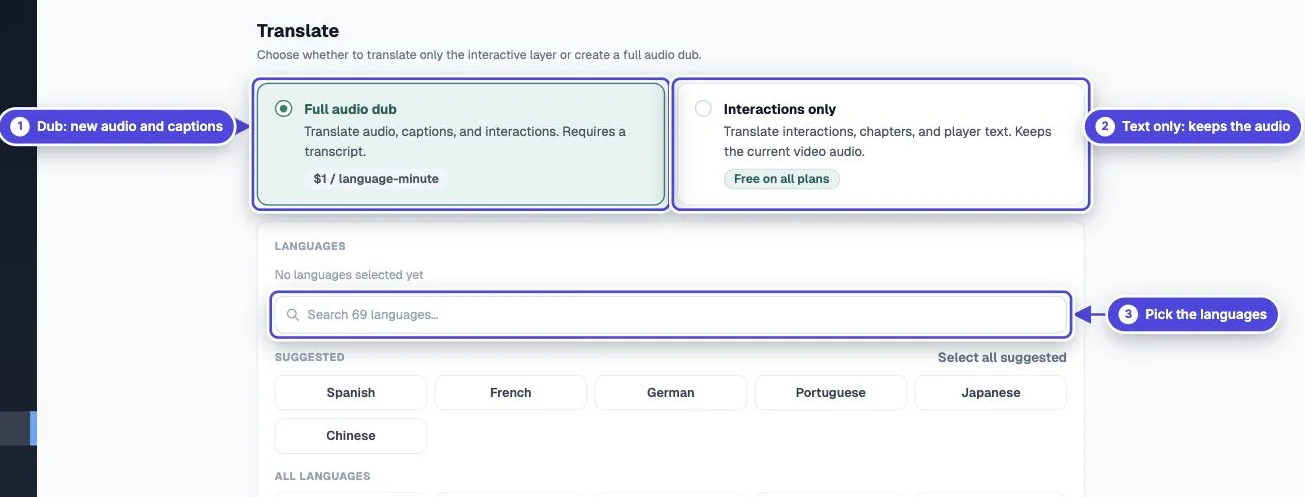
Copy link to How to do it- Open the video and select Translate.
- Choose Full audio dub and select your languages.
- Read the cost summary before you submit. It shows the language-minutes for the job, how many are Covered by monthly quota, and any amount that will be charged.
Included minutes by plan
Copy link to Included minutes by planThe Translate page shows how many included minutes your account has left.
- Basic: 0 minutes included each month. After that: $1 per minute per language.
- Core: 100 minutes included each month. After that: $1 per minute per language.
- Pro: 500 minutes included each month. After that: $1 per minute per language.
- Scale: 1,000 minutes included each month. After that: $1 per minute per language.
- Ultra: 2,500 minutes included each month. After that: $1 per minute per language.
- Enterprise: 500 minutes included each month. After that: Custom options available.
How the minutes are counted
Copy link to How the minutes are counted- Minutes are counted per language. A 4-minute video dubbed into 3 languages uses 12 language-minutes.
- Length rounds up to the next whole minute. A 4 minute 10 second video counts as 5 minutes per language.
- A language you already bought for the same video is reused at no charge.
- Included minutes reset each month.
Worked example
Copy link to Worked exampleYou are on Core with 100 included minutes and have used none this month. You dub a 12 minute 30 second video into Spanish, French and German. Each language counts as 13 minutes, so the job uses 39 language-minutes. All 39 are covered, and 61 minutes remain for the month.
What dubbing is and is not
Copy link to What dubbing is and is notDubbing creates a timed voice track from your edited transcript, plus captions and a transcript in each language. It is not lip-sync. The dubbed track keeps only the new voice, so the original music and sound effects are lost in that language. The original language keeps its original audio. Review the transcript before you submit, because it drives both the audio and the caption timing.