Brett Lindenberg
Video analytics is the measurement of how people watch and respond to video: who pressed play, how much of the video each person watched, where viewers stopped or replayed a section, and what they clicked, chose, or answered along the way. For training content, it matters because a completion checkmark only shows that a video played. Video analytics show which step learners replay, which question most of them miss, and which people need follow-up, so you can fix the lesson with evidence. The same term also names camera software that detects people and vehicles in security footage. This guide covers viewer analytics for training, marketing, and other business video. The short demo below puts you in a trainer's seat with one piece of evidence to act on.
Three kinds of video analytics
Search results and vendor pages use "video analytics" for three different jobs. Know which one you need before you compare tools.
| Kind | What it measures | Typical tools | Main users |
|---|---|---|---|
| Viewer analytics | Plays, watch percentage, drop-off, replays, answers, clicks, conversions | Video hosts, enterprise video platforms, interactive video platforms | Training, marketing, sales, support |
| Playback quality analytics | Startup time, rebuffering, playback failures, picture quality | Player monitoring services | Video engineering and streaming teams |
| Camera analytics | People and vehicle detection, line crossing, counting, face recognition | Video management systems and smart cameras | Security and operations |
The market reports for "video analytics" that we checked measure camera analytics. Grand View Research valued the global video analytics market at USD 12.7 billion in 2024 and projects USD 37.8 billion by 2030, with demand for intelligent security surveillance as the main driver and facial recognition as the largest application segment (Grand View Research). Market.us projects the AI-powered video analytics market to grow from USD 14.5 billion in 2023 to USD 241.8 billion by 2033, across uses such as security, retail customer behavior, and traffic monitoring (Market.us Scoop). Neither figure describes spending on training or marketing video tools.
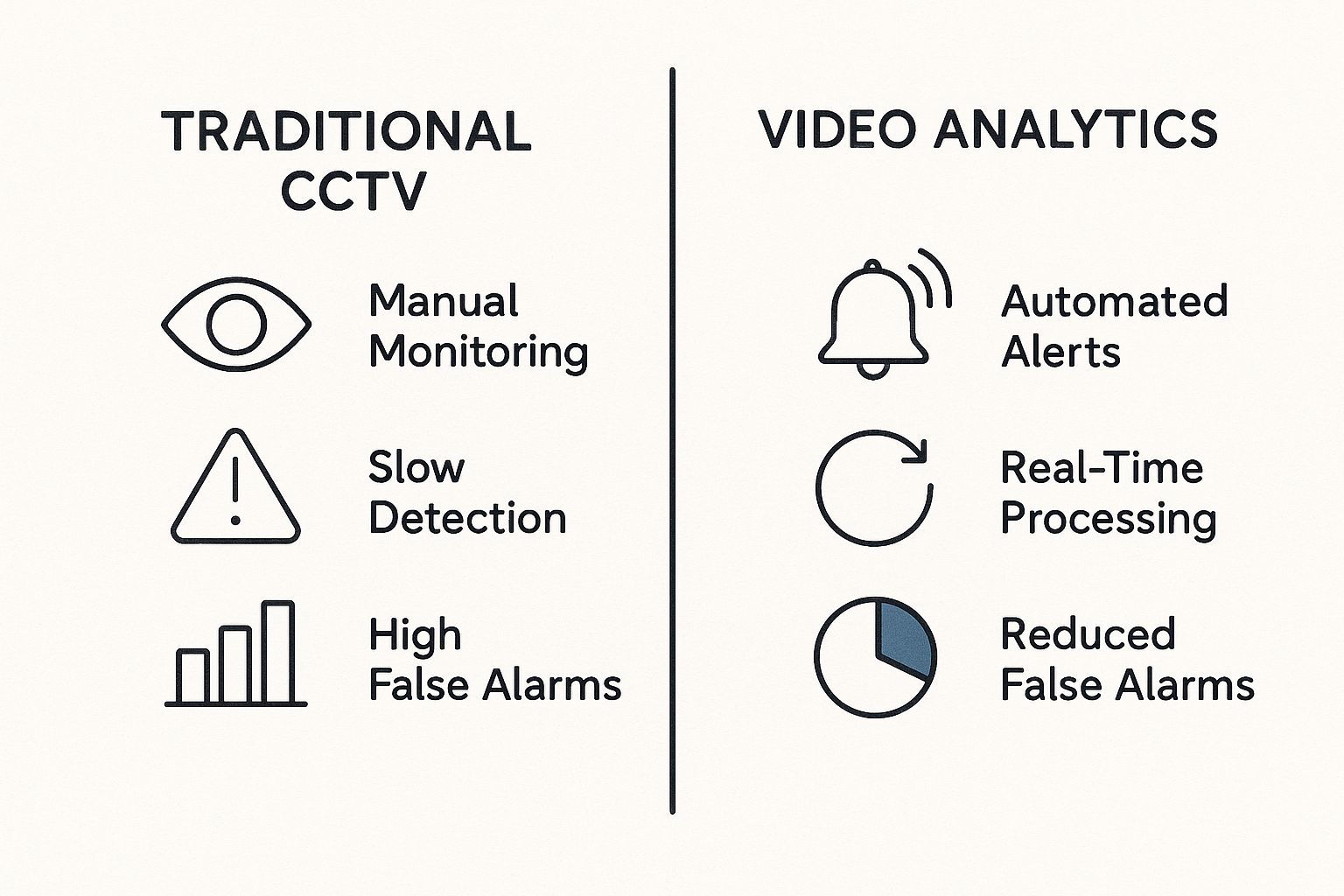
If you want cameras to report site activity, such as people counts, occupancy, or entries into a work zone, read our guide to video analytics software for security cameras. If your question is whether your videos play well for viewers, you need playback quality analytics. Mux Data, for example, groups its quality-of-experience metrics into overall viewer experience, playback success, startup time, smoothness, and video quality (Mux documentation, checked October 2026).
Which video analytics metrics matter?
Each metric answers one question and leaves another open. Read them in pairs: a watch metric tells you where to look, and an answer or click tells you what the viewer understood or did.
| Metric | What it measures | What it cannot tell you |
|---|---|---|
| Plays or views | How many times the video started | Who watched, or how much |
| Unique viewers | How many people watched, often as an estimate | Which people they were, unless viewers are identified |
| Watch percentage | How much of the video a viewer played | Whether the viewer understood it |
| Audience retention and drop-off | The share of viewers still watching at each moment | Why viewers left |
| Replays | Sections played more than once | Whether a replay means confusion or interest |
| Question results | Correct answers and the share of questions answered | Whether the question itself is clear |
| Clicks and choices | Buttons, links, and branch paths each viewer used | What the viewer did after leaving the video |
| Completion | Whether a viewer met your completion rule | Whether the viewer can apply the skill on the job |
Definitions differ by platform, so read the help page before you compare numbers. YouTube reports unique viewers as an estimated count (YouTube Help), and its key moments report marks the intro (the share of viewers still watching after 30 seconds), spikes (moments viewers rewatched or shared), and dips (moments viewers skipped or left) (YouTube Help). In Mindstamp, watched percentage counts the unique seconds a viewer played divided by the video length, so a viewer who replays the same minute does not raise it (Mindstamp Help). Our guide to video engagement metrics defines each metric in more detail.
What watch rate should you expect?
Your own videos are the best baseline, but a reference range helps you judge the first numbers you see. Across 8.07 million views of 18,315 Mindstamp videos (2018 to October 2026), the average view played 46.5% of the video.
| Video length | Videos | Views | Average watched per view | Median video |
|---|---|---|---|---|
| 1 minute or less | 4,952 | 1,630,285 | 59.4% | 65% |
| 1 to 2 minutes | 3,013 | 1,032,707 | 41.5% | 54% |
| 2 to 5 minutes | 3,901 | 2,246,687 | 39.2% | 50% |
| 5 to 10 minutes | 1,554 | 1,130,665 | 45.8% | 39% |
| 10 to 20 minutes | 1,287 | 904,975 | 53.8% | 40% |
| More than 20 minutes | 3,608 | 1,125,238 | 41.7% | 33% |
These figures describe Mindstamp videos, which are mostly training, marketing, and sales videos made by Mindstamp customers. They are not a benchmark for all online video. The median video column falls as length grows: the typical video of one minute or less was 65% watched, and the typical video over 20 minutes was 33% watched. If a 15-minute lesson averages 40% watched, it sits near the middle of this range, so find where viewers stop before you cut it. Videos where viewers took more than three actions per view (answers, clicks, and form entries) averaged 51.8% watched, compared with 43.9% for videos where viewers took no action. Many factors differ between these videos, so treat this as a pattern, not proof.
Why video analytics matter for training content
An LMS can tell you that a learner opened a module and marked it complete. It cannot see inside the video. Video analytics fill that gap with evidence you can act on:
- Drop-off and replays show the step where learners struggle, and the question after that step confirms it.
- Per-learner scores show who missed which concept, so a manager can coach those people and leave everyone else alone.
- A per-learner record of completion and answers, with timestamps, gives an auditor evidence that each person saw and answered the required material.
- If almost everyone answers an opening check correctly, the material is already known. Let those learners skip ahead with branching and send only the others through the full lesson.
What metrics should you track for training and documentation videos?
Track a small set that matches the job of the video.
| Video type | Track | Why |
|---|---|---|
| Compliance and required training | Completion by your rule, score, answers per question, timestamps | Audit evidence for each learner |
| Onboarding and skills | First-attempt correctness per question, drop-off, replays of each step | Find the concept that needs a better explanation |
| Software how-to and documentation | Drop-off before each step, clicks on the job aid or resource link, chapter use | See whether people find the step they came for |
| Customer education | Watch percentage, clicks to the next action, support tickets after viewing | Show whether the video reduces repeat questions |
For a wider view of learning measures beyond video, see our guide to measuring training effectiveness.
How can video analytics help identify knowledge gaps in onboarding?
A knowledge gap shows up as a pattern: learners replay or leave at one step, then miss the question about it. To find it, set the video up for measurement before the first cohort watches.
- Put a question right after each concept a new hire must apply. In Mindstamp, a question pauses the video, and you can require an answer before playback continues.
- Identify every learner with an email address or employee ID, through lead capture, a personalized link, or a URL parameter. Anonymous views cannot be joined across videos or devices later (Mindstamp Help).
- On supported plans, pass the team, role, or location into the link as a URL parameter, such as ?team=support. Each view then carries the value as a variable, and you can filter reports by group.
- After the first cohort, open the question breakdown. A question that many learners miss on the first attempt marks the gap. If you turn on Repeat Until Correct, every attempt counts toward the report score, so a wrong answer followed by a right one scores 50% for that question (Mindstamp Help). Use the interactions export to read first answers.
- Check the drop-off and replays just before that question. The explanation and example at that step are the first places to look.
- Fix that step, then compare first-attempt correctness on the same question for the next cohort.
To report a whole onboarding course, put the videos in one playlist or group and export a completion report with one row per learner and a score column for each video. Our help article on tracking a training course walks through the setup and a test.
How do you use video engagement data to improve training content?
Each signal points to a place in the video and a likely cause. Confirm the cause before you re-record anything, and change one thing at a time so you know what worked.
| Signal | Cause to check first | Change to test |
|---|---|---|
| Many viewers leave in the first 30 seconds | A long intro, or a video sent to the wrong audience | Open with the task, and move background into a chapter |
| Viewers replay one step | The step moves too fast or skips a detail | Slow the step down, add an on-screen callout, or link a job aid |
| Most learners miss one question | An unclear question, or an unclear explanation before it | Rewrite the question first, then the explanation if results stay low |
| Nearly everyone gets an early check right | Learners already know the material | Let correct answers skip ahead with branching |
| Few clicks on a resource link | The link appears too briefly or after the moment it is needed | Show it when the narrator mentions it, and keep it in a resource menu |
| High completion with low scores | Learners let the video play in another tab | Require answers and stop learners skipping ahead |
What analytics should you expect from an enterprise video platform?
An L&D video analytics dashboard should answer two questions without an export: how each video performs, and how each learner is doing. Use this list when you review vendors:
- Per-viewer records tied to a real identity, from SSO, the LMS, or an email address
- A retention or drop-off view for each video
- Question results by question and by learner, with every attempt
- Filters by team, group, course, and date range
- One report across several videos, with one row per learner
- CSV exports, scheduled exports, and an API or webhooks for your data warehouse
- Completion and score sent to your LMS
- Published metric definitions, such as how watch percentage treats replays and skips
- Report access for managers or clients without full admin rights
Which training video tools have the best analytics and reporting?
The right tool depends on where your videos live and whether you need in-video questions. The table compares what each vendor documents on its own site.
| Tool | Viewer-level data | Questions and results | Where the data goes |
|---|---|---|---|
| YouTube Studio | Aggregate audience reports, with unique viewers as an estimate | Not covered in the analytics help pages we checked | YouTube Analytics |
| Vimeo | Retention graph along the timeline, counted by views, not unique viewers; engagement data for forms, cards, and calls to action on Business, Premium, Advanced, and Enterprise plans | Not covered in the analytics help pages we checked | Vimeo's Analytics section |
| Wistia | Heatmaps for each viewer showing what they watched, rewatched, and skipped | Conversion tracking for calls to action and email capture forms | Marketing automation integrations |
| Panopto | Watch time and completion for each viewer, engagement heatmaps | In-video quiz analytics | LMS gradebook integration; filtered report exports |
| Kaltura | Engagement for each user, with a heatmap of the parts each user watched | Quiz reports with scores and attempts for each user | CSV export of all attempts or last attempts |
| Mindstamp | Watch percentage, furthest point, answers, clicks, and branch path for each viewer | Question breakdown, correctness, and participation for each view | CSV exports, completion report, SCORM 1.2 or 2004 package for the LMS; view webhooks on Core and above; interaction and lead webhooks, HubSpot, and the REST API on Pro and above |
Sources: the YouTube Help Center, Vimeo's help articles on retention stats and the analytics panel, Wistia's analytics page, Panopto's tracking and analytics page, Kaltura's help articles on entry analytics and quiz reporting, and Mindstamp reporting.
If your company already runs Panopto or Kaltura, test their quiz reports first, because your videos and permissions are already there. Mindstamp fits when you need questions, branching, and per-learner records on video you already host, including video on Vimeo, Wistia, or Kaltura. Mindstamp no longer offers Panopto import. It adds an interactive layer on top of your existing host and LMS and reports each viewer's actions. Viewers do not need a Mindstamp account. Our training use case page shows how teams set it up.
Video analytics and LMS reports
An LMS enrolls learners, assigns courses, and keeps transcripts. Video analytics record what happened inside each video. Most training teams need both, connected by the same learner ID.
A Mindstamp SCORM package passes the LMS learner name and ID to Mindstamp, so both systems show the same person. The LMS receives completion and a score, and Mindstamp keeps the full detail: watch percentage, every answer, clicks, and branch paths. Mindstamp calculates the two scores differently. The score sent to the LMS follows the video's score settings: which questions count, and whether the first or the most recent answer counts. The Mindstamp report score counts every attempt and leaves out skipped questions. Explain this to your LMS administrator before anyone compares the two.
Common questions about video analytics
Is there a platform that lets me analyze viewer engagement on my training videos?
Yes. Enterprise video platforms such as Panopto and Kaltura report watch time and quiz results for each user. Interactive video platforms such as Mindstamp add questions, choices, and per-viewer reports to video you already host. Pick based on where your videos live today and whether you need questions inside the video.
What is the difference between video analytics and video page analytics?
Page analytics track the page that holds the video: visits, engagement time, and key events. Google Analytics 4 can also record video events for embedded YouTube videos with JavaScript API support enabled: video_start, video_progress at 10%, 25%, 50%, and 75%, and video_complete (Google Analytics Help). Mindstamp's Google Analytics integration sends watch-progress events to GA4 at 10, 25, 50, 75, 90, 95, and 100 percent. Answers and clicks stay in Mindstamp reports. For page-level measures, see our guide to content engagement metrics.
How do I track real user experience for video?
Use playback quality analytics. They measure startup time, rebuffering, playback failures, and picture quality for each viewing session, through a monitoring service connected to your player. Viewer analytics then tell you what people did once the video played.
How soon does video analytics data appear?
Timing differs by platform. YouTube notes that audience retention data takes one to two days to process (YouTube Help). In Mindstamp, a session becomes a finished view when the viewer reaches the end, closes the page, or stops for about two minutes, and totals and exports use finished views. To test reporting, open the share link in a private browser window, because editor preview playback is not recorded.
Can video analytics prove training ROI?
Video analytics supply the learning evidence: who completed the training, what they answered, and where they struggled. ROI also needs business data, such as error rates, sales, or ticket volume, joined to the same learners. Export learner records by email or employee ID and match them to the business metric in a spreadsheet or BI tool. Then compare learners who passed with learners who did not, and treat the difference as a pattern to test.
To start, pick one training video that people must apply on the job. Add one question after the step that matters most, identify each learner, and read the question breakdown after the first group finishes.
Sources and further reading
- Grassroots Creative Agency's guide to data analysis for marketing (July 2025), which covers descriptive, diagnostic, predictive, and prescriptive analysis.