Marketing
Video landing pages: examples and best practices
A strong video landing page gives one audience one reason to watch and one obvious next step. These examples and principles show how to structure it.
On this page
So, what exactly is a video landing page?
At its core, it’s a dedicated webpage built around a single, powerful element: a video. The video isn't just an add-on; it's the main event, designed to grab a visitor’s attention and guide them toward one specific action, whether that's signing up for a trial or making a purchase.
Forget static brochures and walls of text. Think of it more like having your best salesperson ready to give a perfect pitch the moment someone arrives, demonstrating value and building trust in a way words on a screen never could.
Why Video Landing Pages Work
Swapping out traditional content for a dynamic video isn't just a modern trend; it's a strategic move that taps straight into how our brains work. We're visual creatures, hardwired to process images and movement. In fact, our brains process visuals 60,000 times faster than plain text. A video doesn't just ask for attention—it commands it.
This instant engagement is everything. You only have a few seconds to make an impression before a visitor clicks away. A compelling video can stop them dead in their tracks, holding their interest and dramatically increasing the time they spend on your page actually absorbing your message.
Simplifying Complex Ideas
One of the biggest wins for video is its incredible ability to make complicated things feel simple. Ever tried to explain a sophisticated piece of software or a multi-faceted service using only text? It can quickly become a dense, confusing mess for the reader.
A short, punchy explainer video, on the other hand, can show your product in action, turning abstract features into tangible benefits. This clarity cuts through the noise and removes friction from the user's journey. A quick two-minute demo video can often do the work of a thousand words, and do it far more effectively.
Forging a Human Connection
Video has a secret weapon that text and images just can't compete with: it builds a genuine human connection. Seeing a real person speak, hearing the passion in their voice, and picking up on their body language fosters a sense of authenticity and trust that’s hard to fake.
This personal touch is what transforms a transactional webpage into a relational experience. When potential customers feel a genuine connection, they are more likely to trust your brand and feel confident in their decision to convert.
This emotional bridge is what truly sets you apart. It shows the real people and the passion behind your brand, making video landing pages more than just a marketing tool. They become a powerful way to build lasting relationships.
The Real Reason Video Converts So Well on Landing Pages
Let's be honest, adding video to a landing page isn't just about looking modern or trendy. The real magic is what it does for your bottom line. It's about getting measurable results, and understanding this is a huge piece of the puzzle for overall website conversion optimization. When you get it right, a well-placed video has a direct, powerful influence on how visitors behave, driving real business outcomes.
It's one thing to say "video helps," but the data shows us how and how much. One of the most eye-opening stats out there shows that simply adding a video to your landing page can skyrocket conversion rates by as much as 86%, especially for goals like newsletter sign-ups or demo requests.
Why such a huge jump? Because videos grab attention in a way text and images just can't. They deliver a lot of information quickly and create an engaging experience that makes people want to stick around.
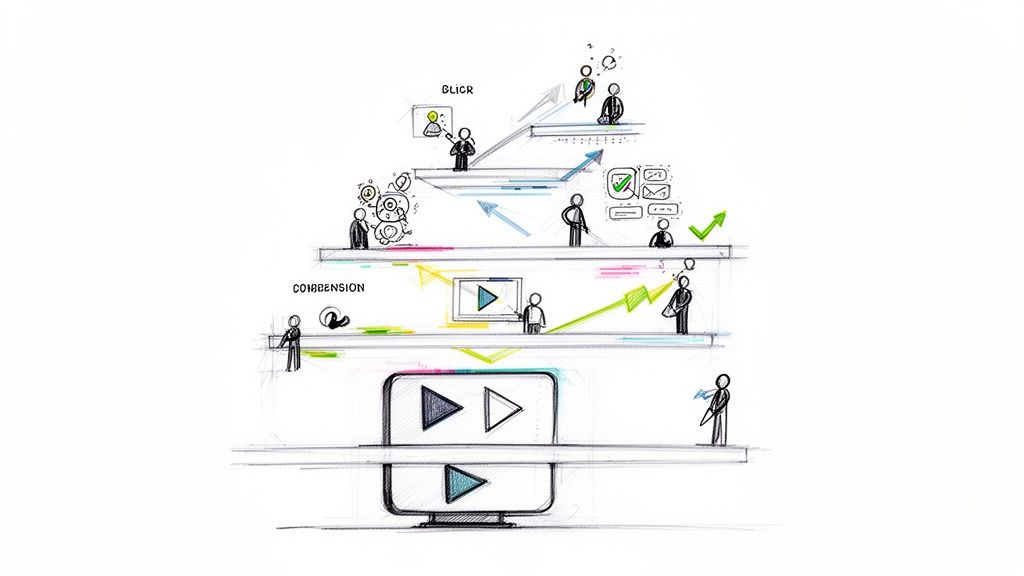
This image really drives home how these improvements stack up across the board.
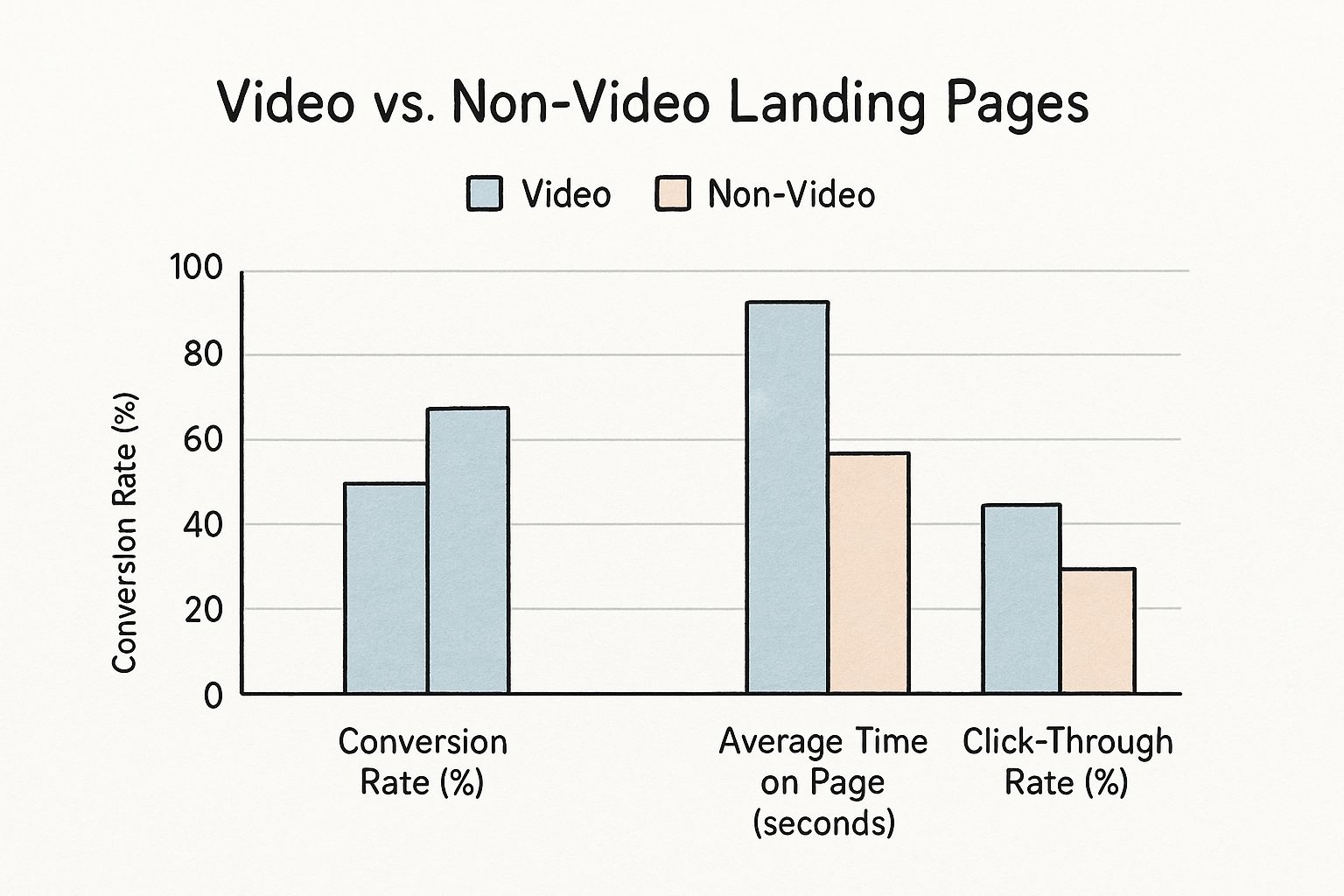
As you can see, pages with video don't just perform a little better—they consistently blow static pages out of the water by keeping people engaged and nudging them toward that "buy now" or "sign up" button.
A closer look at the data reveals how video directly enhances several key landing page metrics, leading to better overall performance.
Video Impact on Landing Page Metrics
| Metric | Impact of Video Integration | Reason for Improvement |
|---|---|---|
| Time on Page | Significant Increase | Visitors stay longer to watch the video, which increases "dwell time" and signals page quality to search engines. |
| Conversion Rate | Boosts by up to 86% | Video simplifies complex ideas, builds trust, and provides a clear, persuasive call-to-action. |
| Message Retention | 95% retention rate | The human brain processes visual information far more effectively than text, making the value proposition more memorable. |
| Emotional Connection | Stronger Brand Trust | Storytelling, tone of voice, and human faces create an authentic connection that static content can't replicate. |
These metrics show that video's impact isn't just a single improvement but a chain reaction that elevates the entire user experience, making conversion a more natural next step for the visitor.
So, How Does Video Move the Needle?
So, what's happening behind the scenes to create such a lift? It’s not just one thing. It's a powerful mix of psychological triggers and practical benefits that directly juice your most important metrics.
It Makes People Stick Around: One of the first things you'll notice is a big jump in dwell time. When someone hits "play," they're committing to spending more time on your page. This not only gives your message more time to land but also sends a fantastic signal to search engines that your content is valuable.
Your Message Actually Gets Remembered: Get this: viewers remember a staggering 95% of a message they see in a video. Compare that to just 10% when they read it in text. That means your unique selling proposition has a much better shot at sticking with them long after they've closed the tab.
It Builds Real, Human Connection: Nothing builds trust and rapport like video. It lets you show off your brand's personality, feature genuine customer stories, or just put a face to the name. This builds an emotional bridge that feels far more personal and authentic than words on a screen ever could.
Turning Browsers Into Buyers
When you combine all these elements, you get a much smoother, more convincing path from "just looking" to "sold."
A great video demystifies your product, answers questions people didn't even know they had, and breaks down the barriers and hesitation that kill conversions. It builds the confidence they need to take the next step.
Building Your High-Converting Video Landing Page
Alright, let's move from theory to practice. Building a video landing page that actually converts is a lot like an architect drafting a blueprint for a high-performance machine. Every single piece has a job to do, and they all work together to guide your visitor toward that one, all-important action. It’s less about flashy decoration and more about ruthless focus.
The first step? A clean, uncluttered layout. Seriously. Your page needs to be free of distracting sidebars, random links, or competing offers. You're trying to create a super-direct path from the moment someone lands on your page to the moment they click your call-to-action. Your video is the main event on that path.
The Anatomy of an Effective Page
A truly successful video landing page hangs on a few core elements that have to work in perfect harmony. Think of them as the pillars holding up your entire conversion strategy.
- The Headline: This isn't just a title—it's your hook. Your headline has to grab attention immediately and give people a reason to care about the video. Make it benefit-driven, keep it short, and spark enough curiosity to make pressing play feel irresistible.
- The Video: This is the heart and soul of the page. Where you put it matters. A lot. Always place your video above the fold, which just means it's completely visible without any scrolling. This guarantees it's the very first thing your visitors see and interact with.
- The Call-to-Action (CTA): Your CTA button needs to be impossible to ignore. Use a color that pops against the background, write clear, action-oriented text (like "Get Your Free Trial" instead of a boring "Submit"), and stick it right next to the video.
It’s this simple, powerful combination—headline, video, CTA—that turns a basic webpage into one of your best conversion assets. It’s a formula that just plain works.
Optimizing for Performance and Engagement
Beyond the basic layout, a few key details can make or break your page's success. Nailing these technical and strategic points is what creates a smooth user experience and keeps people from bouncing.
The data doesn't lie: video is a powerhouse. A HubSpot survey found that 38.6% of seasoned marketers say video has the biggest positive impact on their landing page conversions, beating out images and other graphics.
A slow-loading page is a conversion killer. Your video absolutely must load quickly, or visitors will be gone before they even see your message. Optimize your video file size and pick a reliable hosting platform.
Once you have that solid foundation, you can start exploring more advanced tactics. For example, you can learn how to create interactive video experiences where viewers can click, answer questions, or even choose their own path right inside the player. That kind of hands-on engagement can make the experience feel personal and memorable, which is huge for conversions.
Finally, always design with a mobile-first mindset. Most people are browsing on their phones. Your page, your video player, and your CTA have to look and work perfectly on a small screen. A clunky mobile experience is one of the fastest ways to lose a potential customer for good.
Creating Videos That Actually Convert
Having a slick, well-designed page is a great start, but it's only half the job. Your video is where the real connection happens, and a weak video can torpedo even the most brilliant page design. To create a video that actually gets people to act, you need to be intentional about clarity, quality, and sticking to one powerful message.
It helps to think of your video not as a mini-movie, but as your hardest-working salesperson. It needs to be sharp, persuasive, and get straight to the point from the very first frame.
Nail the First Three Seconds
On the internet, you don't have minutes to earn someone's attention—you have seconds. The first three seconds are your entire audition. Your job is to create an immediate hook that stops the scroll and convinces someone to stick around.
Kick things off with a compelling question, a surprising stat, or a flash of dynamic visuals that instantly signals what you're all about. Skip the long, branded intros or slow, scenic pans. Get right into the action and make your viewer feel confident they've landed in the right place.
A strong opening is a promise to your viewer: "Stick around, because what you're about to see is worth your time." This initial hook is everything when it comes to keeping someone engaged long enough to hear your actual pitch.
This is what makes video landing pages so powerful for grabbing leads and driving sales—they hook attention in a way text just can't.
Choose the Right Video Style
Not all videos are built the same, and the style you pick should be a perfect match for your landing page's goal. Different formats are good for different things, whether it's building trust, explaining a complex feature, or just showing off your product.
Here are a few popular styles that just plain work:
- Explainer Videos: These are brilliant for breaking down a complex service or piece of software into something anyone can grasp. They often use animation to make abstract concepts feel concrete and easy to understand.
- Product Demos: Don't just tell people what your product does—show them. A solid demo walks viewers through your product's features in a real-world setting, building confidence and answering questions before they even think to ask them.
- Customer Testimonials: Nothing builds trust faster than social proof. A video of a real, happy customer sharing their success story is incredibly authentic and far more persuasive than anything you could say about yourself.
Your choice of video style directly impacts how your message lands. An explainer might be great for someone who just discovered your brand, while a detailed demo is better for a prospect who is much closer to making a decision.
Focus on Production Essentials
You don’t need a Hollywood-sized budget, but you do need to focus on quality where it matters most. Shoddy production can make your brand look unprofessional and untrustworthy, which is the last thing you want.
- Crystal-Clear Audio: This one is non-negotiable. People will forgive so-so video quality, but they absolutely will not put up with bad audio. Grab a decent external microphone to make sure your message comes through loud and clear, without any distracting echo or background noise.
- A Focused Script: Don’t just wing it. A tight, focused script keeps you on message and ensures you hit all your key points without rambling. Every single word should serve the video's one goal: getting that viewer to your call-to-action.
- Add Captions: A surprisingly huge number of people watch videos with the sound off. Adding captions makes your video accessible to everyone, whether they're in a noisy office or just prefer to read along.
- A Compelling Thumbnail: Your thumbnail is the "front door" to your video. It has to be high-quality, eye-catching, and interesting enough to make someone want to click play.
In the end, while the video guides the viewer, it's the call-to-action that actually closes the loop. We have a great resource that digs into the importance of adding a CTA to videos to make sure your viewers know exactly what to do next.
Video Landing Pages That Get Results
It’s one thing to know the theory behind a high-converting landing page, but seeing it done right is what really makes it all click. The best video landing pages aren’t just a checklist of best practices. They're finely tuned experiences where the headline, video, call-to-action, and overall design work together in perfect harmony.
Let's pull back the curtain on a few real-world examples from different industries to see how they put these ideas into practice to get some seriously impressive results. Each one is a masterclass in turning a great video into a conversion machine.
Dropbox Business: A Masterclass In Clarity
Take a look at the hero section from the Dropbox Business landing page. It’s a fantastic example of blending a punchy headline with a video that does the heavy lifting.
The headline, "The secure solution for your content," gets straight to the point, hitting a major pain point for its target audience. The video right beside it then shows you exactly what that promise looks like, demonstrating how teams can work together securely and without friction.
Why It Works:
- Benefit-Driven Headline: It's not about features; it’s about the feeling of security and peace of mind. That’s what customers are really buying.
- Strategic Video Placement: The video is front and center. You can't miss it. It’s an open invitation to see the product in action.
- Clear, Contrasting CTAs: The main "Try for free" button pops, while the secondary "Or buy now" option is there for people who are already sold and ready to commit.
This page uses video to instantly back up its headline's bold claim, smoothly guiding visitors toward taking the next step. It’s a textbook play that perfectly aligns the message with the medium.
Shopify Plus: Inspiring Action Through Social Proof
Shopify Plus, the e-commerce platform for big-league businesses, takes a different approach. They use a short, high-energy hero video to build instant credibility. Instead of a "how-to" explainer, their video is a rapid-fire montage of their most successful and recognizable clients.
It brilliantly answers the one question every potential customer has: "Who else trusts this platform?" By flashing logos from powerhouse brands like Kylie Cosmetics and Bombas, Shopify Plus wraps itself in powerful social proof. In just 30 seconds, the video leaves you feeling confident—and maybe a little inspired—about what the platform can do.
The big takeaway here is that your video doesn't always have to be an explainer. Sometimes, the most powerful thing you can do is just show off the incredible results you help others achieve.
This strategy is especially smart for an established B2B brand. It builds trust on sight and speaks directly to a prospect's desire for proven, reliable results. It’s a visual mic drop that establishes their leadership in the market.
At the end of the day, any video landing page is all about driving results. You can explore more about the power of video in web marketing and how businesses of all sizes can put it to work.
How To Measure And Optimize Your Success
Getting your video landing page live is really just the beginning. The real magic happens when you start digging into the data to see what’s working, what’s not, and then fine-tuning your approach based on what you find.
Think of it less like a finished product and more like an ongoing experiment. You have a theory—that your video and page will convince people to act—and now it's time to gather the evidence to prove or disprove it. This all starts with tracking the right numbers, and I don't just mean the big, obvious ones like sales. You need to look closer at how people are actually behaving on your page.
Key Performance Indicators To Watch
To get a clear picture of performance, you need to track a handful of key metrics. These numbers are the breadcrumbs that show you exactly how visitors are interacting with your page and your video, telling you a story about what’s resonating and where you’re losing them.
Here are the big three to keep an eye on:
- Page Conversion Rate: This is the big one. It's simply the percentage of visitors who take the action you want them to take. It’s your ultimate report card.
- Video Play Rate: Of all the people who land on your page, what percentage actually hits the play button? A low number here is a major red flag, often pointing to a weak thumbnail, a boring headline, or poor video placement.
- Audience Retention: This metric is pure gold. It shows you the exact moment-by-moment breakdown of when people stop watching your video. If you see a massive drop-off in the first 5-10 seconds, you know your hook just isn't grabbing them.
Getting a handle on these core stats is your first step. For a deeper dive, you can explore other critical video engagement metrics to really understand what holds your viewers' attention.
Using Data To Drive Improvements
Once you have this data, you can stop guessing and start making smart, informed tweaks. The best way to do this is through A/B testing, where you create two slightly different versions of your page and show them to different groups of visitors to see which one performs better.
A/B testing is how you trade assumptions for certainty. Instead of wondering if a different headline would work better, you can test it against your current one and let your audience's behavior give you the answer.
Don't try to change everything at once. Start by testing the elements that can have the biggest impact. Try out a new video thumbnail, experiment with a much shorter video, test a bolder headline, or change the wording on your CTA button.
For a more holistic view, you can also use tools that give you a complete marketing funnel page score to spot other weak points in the conversion journey. This constant cycle of testing, learning, and refining is how a good video landing page becomes a great one.
Got Questions About Video Landing Pages? Let's Clear Them Up.
Even when you have a solid plan, a few nagging questions always seem to pop up when you're actually building your video landing page. Nailing these little details can mean the difference between a page that pulls people in and one that just pushes them away.
Here are some quick answers to the most common sticking points we see.
Should My Video Autoplay?
Ah, the great autoplay debate. It’s a classic trade-off.
Autoplaying your video on mute can be a fantastic way to grab attention without being obnoxious. On the other hand, autoplaying with the sound on is a fast pass to annoying your visitors and watching them hit the back button.
The safest bet? Start with a clear play button (user-initiated play) or a muted autoplay. The only way to know for sure what works for your audience is to A/B test both options and see what the data tells you.
What’s the Perfect Video Length?
When it comes to video landing pages, shorter is almost always better. You're really aiming for that sweet spot between 30 and 90 seconds.
Think of it this way: your video needs to be just long enough to get your main point and call-to-action across, but short enough that you don't lose your viewer's attention.
If your product is complex and needs more explanation, don't try to cram it all in. Use your short video as a powerful hook, then provide a clear link to a longer, more detailed demo for visitors who are eager to learn more.
This approach respects everyone's time while still giving genuinely interested folks a path to a deeper dive.
At Mindstamp, we're all about helping you build engaging, interactive video experiences that do more than just get views—they drive action. It's time to turn passive watchers into active participants. Discover Mindstamp today and see how our platform can completely change your video game.