Brett Lindenberg
Content engagement metrics measure what people do with your content after they find it: how long they pay attention, how far they read or watch, what they click, and whether they share, save, comment, reply, or answer a question. Impressions and pageviews count how many people saw a piece. Engagement metrics show whether it held their attention and led to an action. For most teams the core set is engagement rate and engagement time on web pages, scroll depth, click rate in email, shares and saves on social posts, and watch percentage and answers on video. Write the question you need answered first, then pick the metric that can answer it. The short demo below gives you one content problem and asks which signal you would check first.
What is content engagement?
Content engagement is the attention and action a piece of content earns from the people who reach it. It sits between reach and results. A post can reach 50,000 people and earn almost no engagement, while a page with 300 visits can produce ten demo requests. Keep the three layers apart in your reports, because each one answers a different question.
| Layer | Example metrics | Question it answers |
|---|---|---|
| Reach | Impressions, views, pageviews, unique visitors | Did people see it? |
| Engagement | Engagement time, scroll depth, watch percentage, clicks, shares, saves, comments, answers | Did it hold attention and prompt an action? |
| Outcome | Sign-ups, leads, demo requests, purchases, course completions | Did it change a business result? |
Many dashboards blur the first two layers. In a WordPress VIP survey of 1,003 marketing and media leaders, run in January and February 2024, the leading content metrics organizations tracked were social media engagement, website engagement, and pageviews (Statista). The first two are engagement measures. Pageviews belong in the reach row, even when a report files them under engagement.
Which metrics show content engagement?
Each channel records engagement its own way. The table lists the metrics that carry the most signal for each channel and where you find them.
| Channel | Metric | What it shows | Where to find it |
|---|---|---|---|
| Website and blog | Engagement rate | Share of sessions that lasted more than 10 seconds, had a key event, or had two or more page views | Google Analytics 4 |
| Website and blog | Average engagement time | Time the page was in focus in the browser, per active user | GA4 Pages and screens report |
| Website and blog | Scroll depth | Whether readers reached the end of the page or a key section | GA4 scroll event, or a heatmap tool for section-level data |
| Click rate | Share of recipients who clicked a link | Your email platform | |
| Social | Engagement rate | Interactions divided by impressions or views, with a formula that differs by network | Native analytics in each network |
| Social | Saves and shares | Intent to come back to a post, or to pass it on | Native analytics in each network |
| Video | Watch percentage and drop-off | How much of the video people played, and where they stopped | Your video platform |
| Interactive video and tools | Answers, choices, clicks | What people said they need, and what they did next | The interactive platform's reports |
| Any channel | Key event rate | Share of sessions that reached the next step you defined | GA4 key events or your CRM |
In Google Analytics 4, an engaged session is one that lasts longer than 10 seconds, has a key event, or has two or more page or screen views. Engagement rate is the share of sessions that were engaged, and bounce rate is the share that were not (Google Analytics Help). Average engagement time counts only the time your page was in focus in the browser, so a tab left open in the background does not inflate it (Google Analytics Help). GA4's enhanced measurement sends a scroll event the first time a visitor reaches 90% of the page depth (Google Analytics Help). That tells you who reached the bottom, but nothing about readers who stopped halfway. For that, a heatmap tool such as Microsoft Clarity, which is free, shows how far down the page visitors scroll and where they click (checked October 2026).
In email, trust clicks over opens. Apple's Mail Privacy Protection stops senders from seeing whether a message was opened (Apple Support), so an open count no longer tells you who read the message.
Social networks count engagement with different formulas. On LinkedIn, Page analytics shows a post's engagement rate as interactions per impression, where interactions include clicks, reactions, comments, and shares (LinkedIn Help). For Instagram, Meta's API counts likes, saves, comments, and shares as total interactions, and it stopped reporting impressions for media created after July 2, 2024 (Meta for Developers). A 3% rate on LinkedIn and a 3% rate on Instagram measure different behavior, so set a separate baseline for each network.
How to analyze content engagement
Start with a decision you need to make. The demo above shows the pattern. A guide gets many visits, but readers do not reach the setup instructions. Of the three signals in the demo, only scroll depth and time spent in each section can show where readers stop. Impressions and follower counts describe the audience before anyone opens the page.
- Write the question. For example: "Why do readers leave the onboarding guide before the setup steps?"
- Choose one primary metric that can answer it and one guardrail metric that warns you if a change makes something else worse. For the guide, that is scroll depth to the setup section, with key event rate as the guardrail.
- Record a baseline over a normal period. Compare later periods of the same length, and avoid holidays and launch weeks.
- Segment before you conclude. Split the data by traffic source, device, new and returning visitors, and content type.
- Read the comments, replies, and survey answers next to the numbers. They tell you why a number moved.
- Change one thing, such as moving the setup steps higher on the page. Then compare the same metric over a similar number of visits.
How can we analyze engagement across different types of content?
Compare formats on an action they share, and compare attention only within a format. Reading time and watch time measure different behavior, so do not rank an article against a video on time alone. A shared action works across formats: the share of sessions that clicked through to the next step, booked a demo, or started a trial. In GA4, tag each page with its type (article, guide, video page, webinar, tool) as a content group. You can then select the Content group dimension in the Pages and screens report and compare key event rates by type (Google Analytics Help). Within each type, use the attention metric that fits the format: scroll depth for articles, watch percentage for video, and completion for courses and quizzes.
Where can I find engagement data for each piece of content?
In GA4, open Reports, then Engagement, then Pages and screens. The report lists each page with its views, active users, average engagement time, and key events (Google Analytics Help). Switch the dimension to page title to rank individual titles. For social posts, open post-level analytics in each network. For video, open the report for each video in your video platform.
To find which titles drive the most engagement, rank them by a rate, such as key events per view, and leave out pages with too few views to compare. Totals favor whichever pieces got the most traffic.
How to measure engagement from sponsored content
Sponsored content runs on someone else's site or account, so you need two sets of numbers: what the publisher reports and what happens on your own site.
- Before you sign, agree which post-level metrics the publisher or creator will share, such as views, clicks, and engagement, and when you will get them.
- Tag every link with UTM parameters: utm_source for the publisher, utm_medium for the placement type, utm_campaign for the campaign, and utm_content for each creative version. Google's guidance is to always set utm_source, utm_medium, and utm_campaign (Google Analytics Help).
- On Instagram and Facebook, ask creators to tag your business as the paid partner. Meta lets a tagged business view insights for that branded content (Meta Business Help Center).
- In GA4, filter by the campaign to see engaged sessions, engagement time, and key events from each placement.
- Give each placement its own landing page or offer code. That catches people who saw the post and came back later without clicking.
- Compare placements on cost per engaged session or cost per key event. Cost per impression measures reach and says nothing about attention.
How to tie content engagement data back to revenue
Engagement connects to revenue when you can link the activity to a person or an account in your CRM. Until then, you can only show that content and revenue moved in the same period.
- Define the key events between content and revenue: a demo request, a trial start, a pricing page visit, a quote form. Mark them as key events in GA4.
- Identify the visitor where asking makes sense, such as a form, a login, or a gated tool.
- Send content activity to the contact record and use attribution reports. HubSpot's attribution reports credit contacts and deals to the interactions that came before them, such as page views, form submissions, and marketing email clicks. Contact create attribution is on Marketing Hub Professional and Enterprise. Deal create and deal revenue attribution are on Marketing Hub Enterprise only (HubSpot Knowledge Base, checked October 2026).
- Compare win rate and deal size for contacts who engaged with a set of content against similar contacts who did not. Treat a gap as a lead to test. People who read more are often closer to buying already.
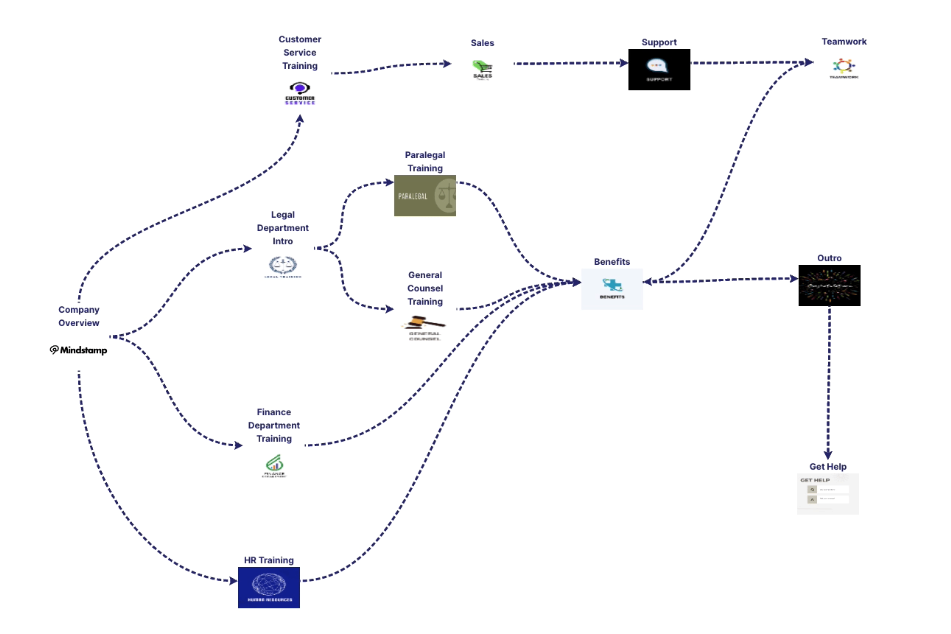
Video can carry the same record. In Mindstamp, each answer and click is stored against the viewer who made it. The HubSpot integration can create or update the contact and add view and answer events to the contact's timeline on supported plans. Mindstamp sends this data after the viewing session ends, so allow a short delay before you check a test record. For the ROI math, see our guide to measuring content ROI.
How to measure content quality
No single metric measures quality. Use engagement data as evidence, then review the piece itself.
- Compare engagement time with reading time. Adults read English non-fiction silently at about 238 words per minute on average, according to a 2019 meta-analysis of 190 studies by Marc Brysbaert (Journal of Memory and Language). A 2,000-word guide takes about eight minutes to read, so an average of 90 seconds suggests that many readers skim it or leave early.
- Check how many people reach the section that does the work, such as the steps, the comparison table, or the demo.
- Count return visits and saves, which show that people came back to the piece.
- Measure the share of readers who clicked through to the next step.
- Read what people tell you in comments, replies, support tickets that cite the page, and answers to a one-question survey.
Google's guidance on creating helpful, reliable, people-first content gives a usable review checklist. It asks, for example, whether the page provides original information or analysis and whether readers would want to bookmark or share it. Check facts, dates, and links on a schedule too. A page with strong engagement can still be out of date. If your content is training, our guide to measuring training content performance covers learning measures.
What software helps measure content engagement?
Most teams need web analytics, the native analytics in each channel, and a CRM that connects activity to people. Add a behavior tool or a video platform with viewer-level data when your question needs it.
| Tool | What it measures | Use it for |
|---|---|---|
| Google Analytics 4 | Engaged sessions, engagement time, scroll, key events, by page, content group, and campaign | Website and blog engagement, sponsored traffic |
| Microsoft Clarity | Click and scroll heatmaps, session recordings | Finding where readers stop on a page |
| LinkedIn and Instagram analytics | Post-level impressions or views, interactions, follows | Social engagement on each network |
| Your email platform | Clicks by link and by campaign | Newsletter and nurture engagement |
| YouTube Studio | Audience retention and key moments for each video | Public video engagement |
| Mindstamp | Watch progress, answers, clicks, and branch paths for each viewer | Interactive video for marketing, sales, and training |
| HubSpot or another CRM | Attribution of contacts and deals to content interactions | Tying engagement to pipeline and revenue |
What to expect from a content performance tool beyond impressions and engagement
A modern content performance tool should do more than count interactions. Look for these capabilities:
- A breakdown by individual piece, and by content type, topic, author, or campaign
- Depth inside the piece: the scroll position, watch position, or section where people stop
- Outcomes attached to content, such as key events, leads, or pipeline, through a CRM connection
- Person-level records for people who identified themselves and consented, so sales and success teams can follow up
- Exports or an API, so the data can sit next to revenue in your own reports
- Published metric definitions, so you know what each "engagement" figure counts
- Filters for internal traffic and bots
For product and platform engagement, such as daily active users and feature use, see our guide to user engagement metrics.
Engagement metrics for video and interactive content
Video has its own set: play rate, watch percentage, the point where viewers drop off, and replays of a section. Our guide to video engagement metrics defines each one, and the overview of what video analytics measures covers platforms, training use, and what to expect from a video report.
Interactive video adds data that page analytics cannot see: what each viewer answered, chose, and clicked inside the video. In Mindstamp, a question pauses the video and records the answer against the viewer. The per-view report lists each answer and click with its timecode, next to the viewer's watch progress. If your site reports in GA4, the Google Analytics integration sends watch-progress events at 10, 25, 50, 75, 90, 95, and 100 percent, so video depth sits next to page engagement. Answers and clicks stay in Mindstamp reports.
Mistakes that distort engagement data
- Your own team's visits inflate engagement. Define internal traffic in GA4 and exclude it with a data filter (Google Analytics Help). Data that an exclude filter removes is gone for good, so test the filter before you activate it.
- Inconsistent campaign names split your data: "SummerSale" and "summer_sale" show up as two campaigns. Agree on lowercase UTM values and write them down.
- Totals reward reach. The post with the most likes is often the post that reached the most people, so rank posts by rate.
- One engagement rate across networks hides differences, because LinkedIn and Instagram count different actions.
- A pattern in the data may have another cause. If you publish your best-researched posts on Mondays, Monday posts earn more shares for reasons that have nothing to do with the day. Test the day on its own before you move your calendar.
- Since Apple's Mail Privacy Protection, an email open count no longer shows who read the message, so report clicks.
To put this to work, pick one page that gets traffic and little action. Write the question you need answered, choose the one metric that can answer it, make one change, and check that metric again after a similar number of visits.
Sources and further reading
- Smart Insights' global social media statistics summary, a running roundup of social media usage research for audience-size context.
- SuperX's guide to measuring content engagement (May 2025), which covers engagement measures on several social platforms.