Brett Lindenberg
A video CTA (call to action) is the prompt that tells a viewer what to do next, such as "Book a demo" or "Download the checklist." It can be a spoken line, text on screen, or a button the viewer clicks inside the player. Any video made for a business goal needs one. Without it, a viewer who is ready to act at the last frame has to find the next step alone, and the video gets no credit if they do. Strong video CTAs ask for one specific action and appear right after the video gives the viewer a reason to act. In the demo below, three CTAs appear right after a product test.
What is a CTA in a video?
A call to action is a prompt that asks someone to take a specific next step. HubSpot's guide to types of CTAs (updated November 2025) lists ten for websites, including lead generation and closing the sale. Most of them have a video version. In a video, the CTA takes one of four forms:
- A spoken line, where the presenter says what to do next.
- Text or an end card added in a video editor. When editors say "CTA," they usually mean this kind of overlay. It shows wherever the file plays, but nobody can click it.
- A platform feature, such as a YouTube end screen or a Vimeo call-to-action end screen. These are clickable, but each platform limits when and where they appear.
- An interactive element drawn by the video player, such as a button, a clickable area over a product, or a clickable image. It can appear at any second and records who clicked it.
Where the platform allows it, pair a spoken line with something the viewer can click. Our guide to video overlays explains how text burned into the file differs from an overlay drawn by the player.
Why add a call to action to your videos
A CTA connects a video to a business goal in the following ways.
It moves the viewer to the next stage
Viewers arrive at different stages of a decision. A viewer who just heard of you needs a short overview, while a viewer who is ready to buy needs a demo or a cart. Build the CTA for the stage the video serves. We explain how this works across a buying journey in guiding customers through the sales funnel.
It gives the video a result you can measure
Views and watch time tell you how many people watched. A CTA click tells you how many acted. HubSpot's guide to marketing KPIs defines conversion rate as the percentage of visitors who complete a desired action, and in a video the CTA click is that action.
It tells you what each viewer wants
When a video offers a choice of CTAs, the click is also an answer. A viewer who picks "See pricing" over "Watch the setup video" has told you where they are. Mindstamp records each click against the viewer and the moment in the video, so sales or support can follow up on what that person chose.
What purpose does a call-to-action serve in a short-form video?
In a YouTube Short, an Instagram Reel, or a TikTok, the CTA carries an interested viewer from the feed to something longer or more specific, such as the full video or a product page. The viewer can swipe away at any moment, so the CTA has to land before they do.
YouTube's July 2026 guide to growing long-form views from Shorts gives a concrete method. Attach a Related video link to the Short, which sends viewers to a long video, a live stream, or another Short on your channel. Then build verbal and visual cues into the final 5 seconds: tell viewers what to do, and point to the link or flash a brief overlay. The long video should address the promised topic within its first 5 to 10 seconds, so the click pays off.
Do not count on the final seconds alone. Across 8.07 million views of 18,315 Mindstamp videos (2018 to October 2026), views of videos 1 minute or shorter played 59.4% of the video on average. Mindstamp videos are mostly training, marketing, and sales videos, not social clips, so treat this as a rough guide. It still shows that some viewers leave even a short video before the end. Say the CTA once in the middle and again at the close.
Types of video CTAs by goal
Choose the CTA from the goal of the video, then pick the format and the moment that fit it.
| Goal | Example CTA | Format | Where it goes |
|---|---|---|---|
| Keep watching | "Watch the 3-minute setup video" | Link or branch to the next video | End of the video, or at a chapter break |
| Learn more | "Download the spec sheet" | Button that opens a page or downloads a file | Right after the feature it explains |
| Capture a lead | "Get the full report" | Form inside the video | After the video has delivered something useful |
| Book a meeting | "Pick a time with our team" | Button that opens a calendar | Close of a demo or sales video |
| Buy | "Add to cart" | Clickable area over the product | While the product is on screen |
| Confirm a training step | "I have read the policy" | Button the viewer must click before the video continues | At the step that needs the acknowledgment |
| Get help | "Call support" | Button that starts a phone call or an email | Where the video explains the problem |
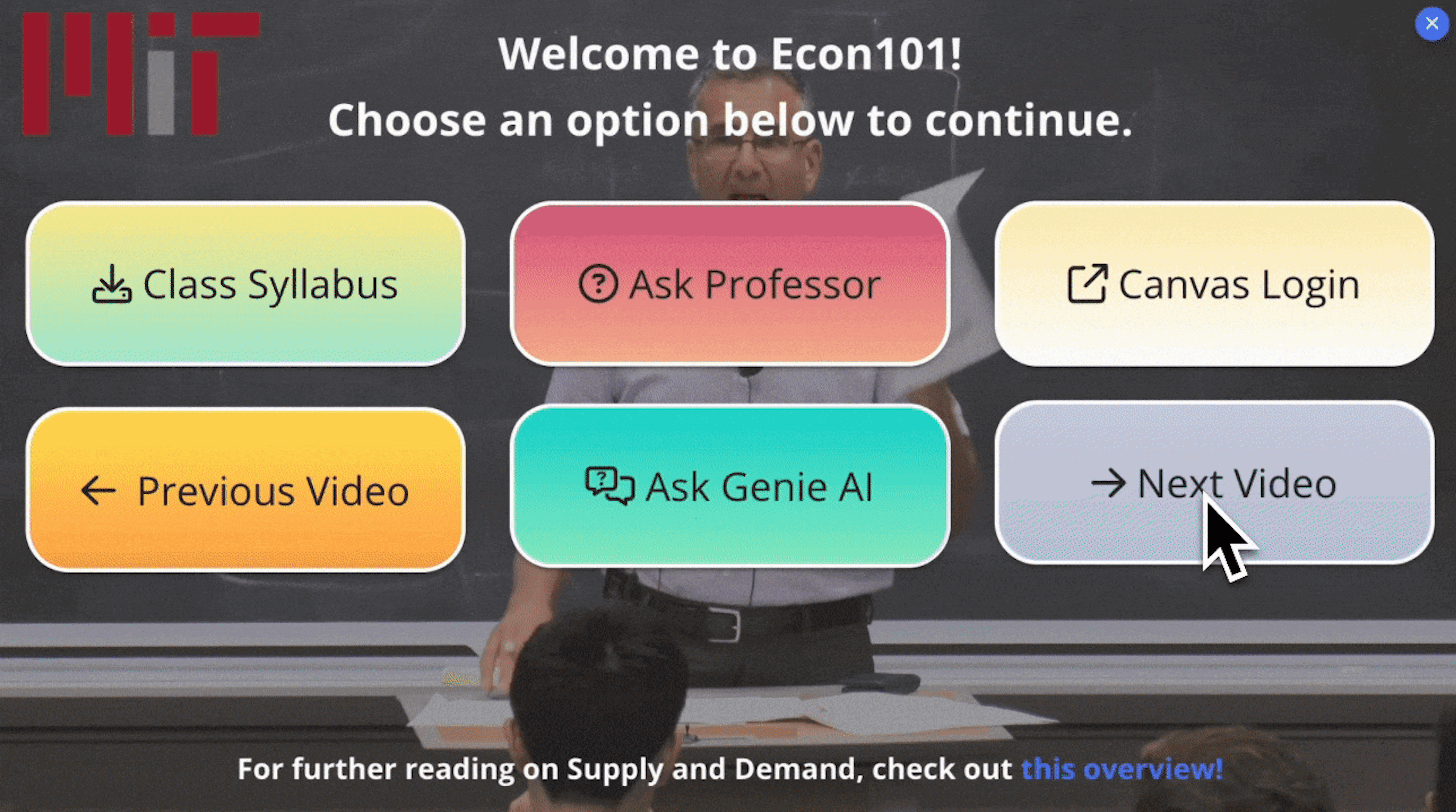
Give each video one main goal. If the audience splits into groups, offer two to four choices that exclude each other, as the demo above does, and give each choice its own destination.
Video CTA best practices
Put the first CTA where the video earns it
Place the ask right after the moment that gives the viewer a reason to act, such as the feature demo or the test result. Then repeat it at the end for viewers who stayed. Lemonlight's tips for a strong video CTA give the same advice: make the ask in the early-to-middle stretch and reinforce it at the end. In the Mindstamp data above, the average view across all video lengths played 46.5% of the video, so plan for viewers who never reach the last seconds.
Say it and show it
Speak the CTA and put it on screen at the same moment. Viewers watching with the sound off still see it, and viewers listening while they look away still hear it. YouTube's Shorts guidance recommends the same pairing of verbal and visual cues.
Write a label that names the result
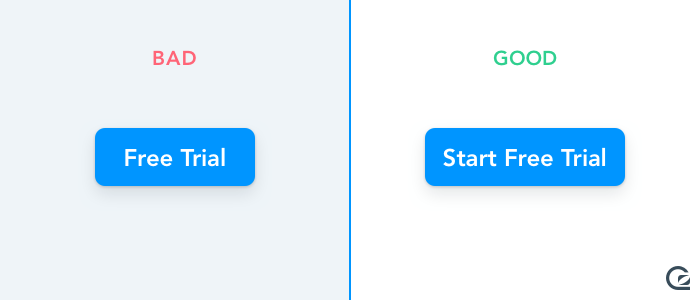
Start with a verb and say what happens: "Download the checklist" or "Book a 20-minute call." Avoid "Click here" and "Submit." WCAG 2.2 success criterion 2.4.4 asks that the purpose of each link be clear from its text or its context, which helps people who use screen readers. A specific label also makes your click reports easier to read. Keep it short, because a long label wraps on a phone and makes the button taller.
Make it look clickable and easy to read
A button over video sits on a picture that changes from scene to scene, so give it an opaque background and a border, and check it over the lightest and darkest frames behind it. WCAG 2.2 sets useful minimums for any clickable control:
- Text on the button needs a contrast ratio of at least 4.5 to 1, or 3 to 1 for large text.
- The edge of the button needs a contrast ratio of at least 3 to 1 against the colors next to it (non-text contrast).
- The clickable area should be at least 24 by 24 CSS pixels (target size). A player on a phone is much smaller than your editor, so check the button size on a phone.
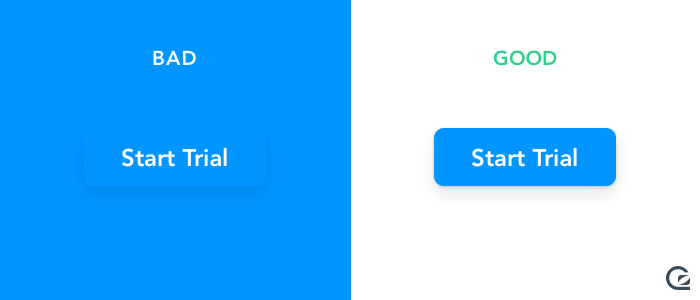
Keep it off the action
Put the CTA where it does not cover a face, the product, captions, or the player controls. A corner works for a CTA that stays on screen. A CTA that is the point of the moment, such as a choice between paths, can sit in the middle of the frame while the video pauses.
Decide whether the video pauses
A mid-video CTA usually leaves the video playing, so viewers who are not ready can keep watching. At the end, or at a choice point, pause until the viewer clicks so the CTA stays on screen. In Mindstamp, each button can keep playing, pause when it appears, or pause at its hide time until the viewer clicks it.
Match the CTA to the viewer
If one video serves several audiences, show each viewer the CTA that fits them. HubSpot's CTA statistics roundup and Protocol 80's list of CTA best practices both cover personalized CTAs on websites.
In a video, a matched CTA can change with the viewer's earlier answer or with a role passed in the link. On supported plans, Mindstamp conditional logic shows or hides a CTA based on those signals, and personalization variables can put the viewer's name or company in the button label.
Test one change at a time
Test wording, placement, and timing separately, with one change per test, and compare clicks for each version. Because every click carries its timecode, you can see whether moving a CTA earlier changed who clicked. Our page on testing video CTAs covers what to compare.
Video CTA examples for B2B
A B2B video usually sits early in a long buying process, so its CTA should ask for the next step in that process. Examples by video type:
- Product demo: "See pricing for your team size," or "Book a 20-minute walkthrough" with a Calendly or HubSpot calendar that opens over the video.
- Prospecting video from a sales rep: a button that uses the viewer's first name, such as "Pick a time, Dana," filled in from a personalized link.
- Webinar recording: "Get the slides" near the start, and "Talk to our team" after the questions.
- Customer story: "See how the setup works," linked to the product page that matches the story.
- Customer onboarding: "Open the setup guide" next to the step it explains, and a button that starts a call to support.
For more on sales use, see interactive video for sales teams and our guide to B2B video marketing.
Interactive video CTAs
An interactive video CTA is a clickable element that the video player draws over the video, such as a button, a hotspot over a product, or a clickable image. Hosting platforms offer a limited version. YouTube end screens can only use the last 5 to 20 seconds of a video, and a Vimeo call-to-action end screen appears after the video finishes. An interactive player lets you place the call to action at any second and choose what the click does. In Mindstamp, a CTA can:
- open a page in a new tab, or in a window over the video (open links)
- jump to another part of the video, or branch to another video (video branching)
- ask for the viewer's name and email before the click runs (lead capture)
- open a Calendly or HubSpot calendar over the video
- start a phone call or an email
- add a product to a Shopify cart inside the video
Mindstamp records each click with the viewer and the timecode, and the viewer report shows who acted and when. For setup steps, read how to add call-to-action buttons to your videos.
How to connect video CTA clicks to your CRM
A CTA click is most useful when it reaches the system your team follows up from. A click can only be tied to a person if the viewer is identified, through lead capture, a personalized link, or URL parameters such as ?email=. In Mindstamp, the routes are:
- HubSpot, on supported plans: creates or updates the contact by email and adds the view and the clicks you select to the contact timeline. See how the HubSpot integration works.
- Webhooks, on supported plans: view, interaction, and lead records sent as signed JSON to your endpoint. See how webhooks work.
- Zapier, on supported plans: finished views, viewers, and interactions, sent to other apps.
- Salesforce: Salesforce integration is quoted per account; confirm its scope with Mindstamp.
HubSpot, webhooks, and Zapier receive the data after the viewing session ends, when the viewer finishes, closes the page, or stops for about 2 minutes, so allow for a delay before a click shows up in your CRM. Google Analytics receives watch-progress events but not clicks, so CTA clicks stay in Mindstamp reports and the routes above. To carry campaign data to the page a CTA opens, turn on Append variables when opening links in the video's settings (variables work on supported plans). Values passed in the video link, such as utm_source, are then added to the link the CTA opens. The data map for each integration lists every field.
How to measure whether a video CTA works
- Click rate: divide clicks by the views that were still playing when the CTA appeared. Dividing by all views makes a mid-video CTA look weaker than it is. In Mindstamp, drop-off reports on supported plans show how many views reached each point.
- Platform reports: YouTube shows an end screen element click rate on the Engagement tab in YouTube Analytics, Vimeo tracks its call-to-action end screen in the video's Analytics tab, and Wistia counts annotation link clicks in the Engagement tab.
- What happens after the click: form fills, meetings booked, or orders on the destination page. Compare CTAs on these results as well as on clicks, since a CTA with fewer clicks can still book more meetings.
Common questions about video CTAs
Should the call to action go at the end of the video?
Put one at the end, but not only there. Viewers who reach the last frame are the most interested, and an end-of-video CTA gives them a next step. Many viewers leave earlier, so add the CTA right after the video's main point as well.
What does CTA mean in video editing?
In editing, a CTA is usually text, a graphic, or an end card placed on a track above the footage, such as "Visit our site" in the last few seconds. It becomes part of the exported file, so it shows on every platform, but viewers cannot click it. A clickable CTA has to come from the platform or the player.
How many CTAs should one video have?
Plan one main CTA and repeat it. If the video serves different viewers, offer two to four options at one decision point. More than that makes the choice harder and the report harder to read.
How do I add a CTA button to a video?
On YouTube, use an end screen or a card in YouTube Studio. On Vimeo and Wistia, use their call-to-action settings. To place a button at any second and track each click, add it in an interactive player and share or embed that player. Our step-by-step guide to adding CTA buttons covers each method.
Sources and further reading
- invideo, video marketing statistics: a roundup of third-party figures on video use. An earlier version of this article quoted its claim that viewers retain 95% of a message from video and 10% from text. The roundup credits that figure to a marketing agency, and we could not trace it to a study, so we removed it.
- UX Planet, 8 handy tips on CTA button design: a designer's article on CTA buttons for websites and apps.