Brett Lindenberg
The best eLearning authoring tool depends on who builds your courses and where learners take them. Instructional designers who need custom interactions usually choose Articulate 360. Teams that already build training in PowerPoint get the fastest start with iSpring Suite, and Adobe Captivate is strongest for software simulations. Lectora and dominKnow | ONE suit regulated or high-volume catalogs. If subject-matter experts will write the courses, look at 360Learning, Easygenerator, or Create (formerly Elucidat). For narrower jobs, H5P.com adds activities inside an LMS, 7taps builds microlearning, and Mindstamp, our product, makes training video interactive.
Mindstamp publishes this guide and lists its own product first. We checked every vendor fact below on the vendor's own pages on October 1, 2026. Prices are the public list prices shown that day; most vendors quote larger deals. This is a review of documentation and pricing pages, not a hands-on benchmark, so run your own trial before you buy.
Quick comparison
| Tool | Type | Where you author | LMS standards the vendor lists | Public price | Best fit |
|---|---|---|---|---|---|
| Mindstamp (our product) | Interactive video layer | Browser | SCORM 1.2 and SCORM 2004 export | See the Mindstamp pricing page | Questions and branching in existing training video |
| 360Learning | LMS with built-in AI authoring | Browser | Imports SCORM, xAPI, cmi5, and AICC | Team plan $8 per user per month (up to 100 users) | Courses written by internal experts |
| Articulate 360 | Authoring suite with an LMS (Reach) | Storyline: Windows desktop. Rise: browser | SCORM, AICC, xAPI (Tin Can) | From $1,449 per seat per year | Custom interactions and fast responsive courses |
| Adobe Captivate | Desktop authoring | Windows or macOS | SCORM 1.2, SCORM 2004, AICC, xAPI | US$39.99 per month | Software simulations and responsive slides |
| iSpring Suite | PowerPoint add-in | Windows with desktop PowerPoint | SCORM 1.2, SCORM 2004, xAPI, cmi5, AICC | $970 per author per year | Turning slide decks into tracked courses |
| Lectora | Desktop and online authoring | Windows desktop or browser | SCORM 1.1, 1.2, 2004; AICC; xAPI; cmi5 | Quote (Gold Suite bundle) | Accessible courses with complex logic |
| dominKnow | ONE | Cloud authoring and content management | Browser (on-premises option) | SCORM, xAPI, AICC | Quote, priced per author | Reusing content across many courses |
| Create (formerly Elucidat) | Cloud authoring | Browser | SCORM file or web link | Quote | Branded courses in many languages |
| Gomo Learning | Cloud authoring with hosted delivery | Browser | SCORM, or hosted delivery to several LMSs | Quote, based on users and storage | Multilingual courses that change often |
| Easygenerator | Cloud authoring for subject-matter experts | Browser | SCORM, Dynamic SCORM, xAPI | Pro $1,399 per year (1 author) | Courses written by experts outside L&D |
| H5P.com | Interactive activities for an LMS | Browser | LTI connection to the LMS | Priced by number of authors | Quizzes, interactive video, and games inside Moodle or Canvas |
| 7taps | Microlearning | Browser | SCORM and xAPI export on Enterprise | Free plan; Starter $4,995 per year | Short mobile lessons sent by link or chat |
What an eLearning authoring tool does
An authoring tool (also called a content authoring tool or eLearning creation software) is the software you use to build the course itself: the screens, media, interactions, and quizzes, plus the package your LMS reads. A learning management system enrolls learners, assigns courses, and keeps completion records. Some products do both. When people search for LMS authoring tools, they usually mean an LMS with a built-in course builder, such as 360Learning, or an authoring suite that now includes delivery, such as Articulate 360 with Reach.
Most tools fall into one of four groups:
- Desktop tools give one author the most control over layout and logic. Storyline, Captivate, iSpring Suite, and Lectora Desktop are in this group, and most of them run only on Windows.
- Online authoring tools run in a browser, so reviewers and co-authors work in the same project. Rise, dominKnow | ONE, Create, Gomo, Easygenerator, Lectora Online, and 7taps are in this group.
- LMS platforms with built-in authoring keep the course and the learner records in one system. 360Learning is the clearest example here.
- Interaction tools add activities to content you already have. H5P adds them to LMS pages, and Mindstamp adds them to video.
If you are still choosing the LMS, start with our comparison of LMS platforms for small businesses, because the LMS decides which package formats you need.
1. Mindstamp (our product)
Mindstamp is our interactive video platform, and it does a narrower job than the other tools on this list. It does not build slide-based courses. You upload a training video or connect one from a host such as Vimeo or Wistia, then add questions, hotspots, and branches on the video timeline. A question pauses the video, and you can require an answer before playback continues. A wrong answer can send the learner back to the explanation, and a choice can open a different scene.
Each learner's answers, clicks, and path appear in a per-viewer report. For LMS tracking, Mindstamp exports a SCORM package (SCORM 1.2 or SCORM 2004) that sends completion and a score to your LMS. It does not export xAPI or cmi5; our help center explains what to use if your LMS requires xAPI. Mindstamp is not an LMS, so you still need one to enroll learners and keep transcripts.
Choose Mindstamp when your training already exists as video, such as onboarding, safety walk-throughs, or product demos, and you want proof of understanding at the moment a concept is taught. Pair it with a course tool when you also need text pages, glossaries, or software simulations. Our Mindstamp and Articulate 360 comparison shows where each one fits, and the training use case page shows examples.
Pricing: plans are on the Mindstamp pricing page. SCORM export is on Core and higher plans. The free trial lasts 14 days and needs no payment card.
2. 360Learning
360Learning sells an AI-driven LMS with collaborative authoring built in. Its AI Content Builder drafts an interactive course from documents, a prompt, or both. Subject-matter experts then edit the course as co-authors, using inline comments and feedback inboxes, while the L&D team keeps review and approval. Because authoring and delivery sit in one platform, a course built there goes live without a separate export and upload step.
The authoring side covers the core course-building jobs. Authors can choose from more than 10 question types, including pick-a-point, fill-in-the-blank, and open-ended questions. Learners can react to a course with one click (for example "This is outdated"), and those reactions feed a relevance score that tells authors which courses need an update. AI translation creates other language versions from one course. For older content, 360Learning says it imports SCORM, xAPI, cmi5, and AICC packages, and it can bulk import SCORM 1.2 and SCORM 2004 libraries.
Strengths and use cases
360Learning fits organizations whose training knowledge sits with internal experts: onboarding programs written by team leads, compliance refreshers owned by policy teams, sales enablement written by top sellers, and frontline or customer training at scale. It syncs with HR systems such as Workday, SAP, and BambooHR (the vendor lists more than 80 integrations), so new hires can be enrolled automatically.
Pricing
The Team plan costs $8 per user per month for up to 100 users, billed monthly with no annual commitment. Business and Enterprise plans have custom pricing, usually on annual contracts, and can mix registered and monthly active users in one contract. A 30-day free trial is available (pricing page checked October 1, 2026).
Pros and cons
- Pro: authoring, delivery, and reporting share one system, so there is no package to export and upload for courses built inside it.
- Pro: experts can draft and update courses while L&D keeps review and approval.
- Pro: the Team plan has a public per-user price, which makes a small pilot easy to budget.
- Con: it is an LMS purchase. If you already run another LMS and only need a course builder, you would be paying for a second platform.
- Con: teams that want slide-level control over custom animations and triggers may prefer a desktop tool such as Storyline.
Website: https://360learning.com/
3. Articulate 360
Articulate 360 bundles two authoring apps. Storyline builds slide-based courses with layers, triggers, and states, so you can create almost any custom interaction, and it offers 25 question types. Rise builds courses from pre-made blocks in a browser and adapts them to every screen. The subscription also includes Review for stakeholder comments, an AI Assistant, and Reach, Articulate's own LMS for sharing and tracking courses. Storyline publishes SCORM, AICC, and xAPI (Tin Can) content, and Articulate says it helps authors meet Section 508 and WCAG requirements.
Storyline runs on Windows. Articulate's system requirements support Mac users only through Parallels Desktop or VMware Fusion. Rise and Review work in any modern browser.
Articulate now sells its subscription as Articulate 360 AI. On the pricing page we checked on October 1, 2026, Articulate 360 AI cost $1,449 per seat per year for a personal license and $1,749 per seat per year for teams. Translation into 80+ languages and AI avatar videos use credits that you buy separately, starting at $250 for 50,000 credits. A separate Frontline plan starts at $500 per year with unlimited seats and 100,000 credits. The free trial lasts 14 days.
Choose Articulate 360 when trained instructional designers build most of your courses and you want both custom interactions and quick responsive modules. Plan for the annual seat cost, the Windows requirement for Storyline, and credit use if you translate often.
4. Adobe Captivate
Adobe Captivate is a desktop authoring tool that Adobe has rebuilt as an all-new version. The older product is now called Captivate Classic, and every Captivate subscription includes it so you can maintain old courses until you migrate them. The current version runs on Windows and macOS, according to Adobe's system requirements (search extract).
Captivate is strongest in systems training. It records software simulations and supports interactive videos, branching, and quizzes. Other features from Adobe's feature page:
- PowerPoint import that converts each slide element into an editable native object
- Responsive text and media blocks with a live device preview
- A widget gallery with drag-and-drop, click-to-reveal, flip cards, hotspots, and timelines
- Generative AI for images, avatars, narration voices, and closed captions
- Design support for Section 508 and WCAG 2.1
The FAQ on Adobe's Captivate page lists SCORM 1.2, SCORM 2004, AICC, and xAPI as the supported LMS standards (checked October 12, 2026). Adobe listed Captivate at US$39.99 per month on October 1, 2026, with a free trial. Choose it for software rollouts and process training where learners must practice clicks in a realistic interface. If your courses use video, see our guide to making employee training videos before you record.
5. iSpring Suite
iSpring Suite turns PowerPoint into a course authoring tool. It installs as a PowerPoint add-in, so anyone who can build a slide deck can start without learning a new interface. That makes it a practical choice when subject-matter experts already own the training slides.
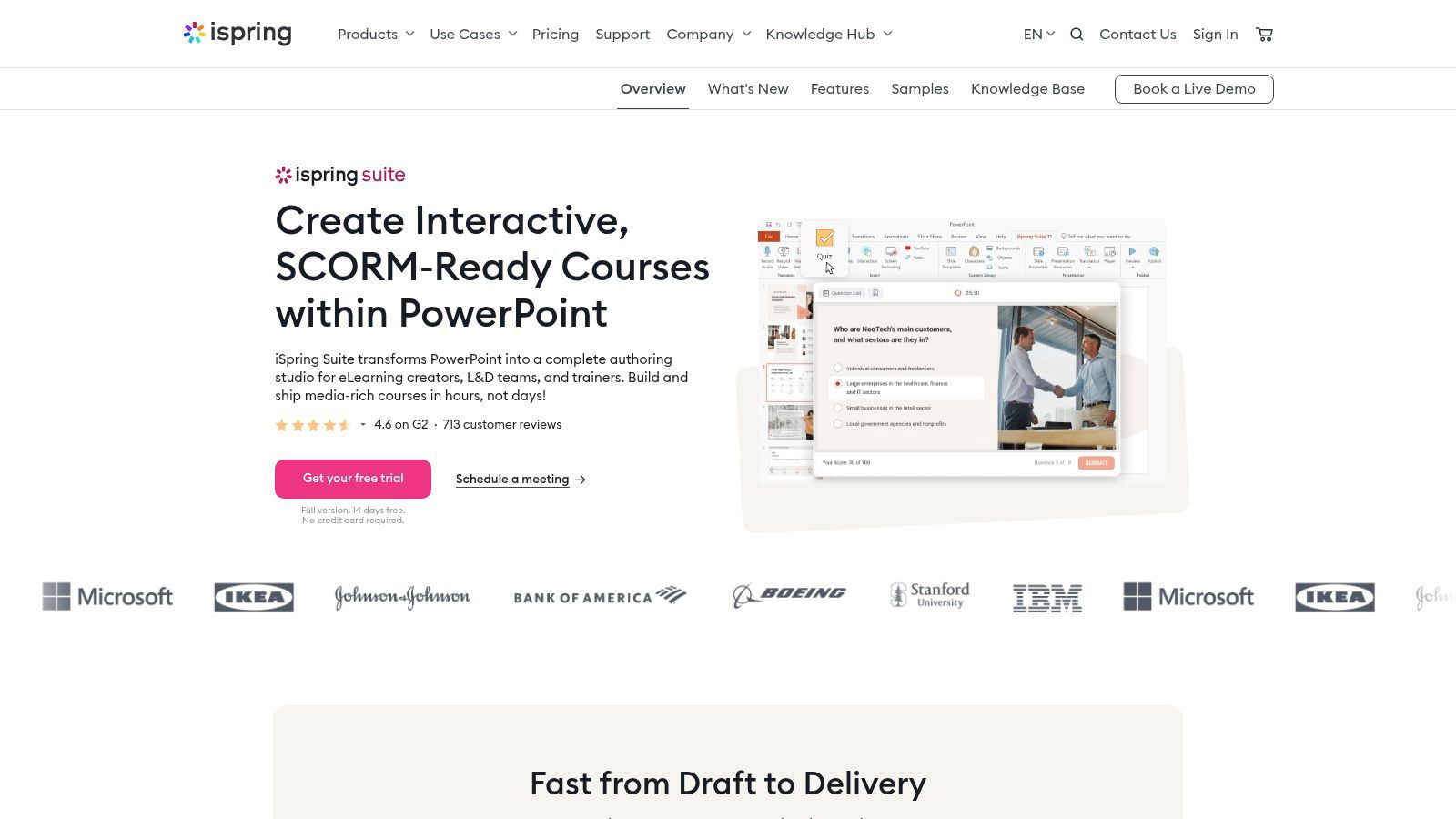
What PowerPoint-based authoring capabilities does iSpring Suite offer for corporate training developers?
From iSpring's product and feature pages (checked October 1, 2026):
- Courses are built in PowerPoint and can reuse existing slides and Word or PDF documents.
- Quizzes use 14 question templates, including matching, hotspot, drag-the-words, Likert scale, and sequence questions, with time limits, attempt counts, passing scores, and branching after a wrong answer.
- Branching dialogue simulations let you build role-plays with characters, locations, voiceovers, and scoring, which suits sales and customer service practice.
- 14 interaction templates add timelines, tabs, FAQs, and glossaries.
- A screen recorder captures software tutorials with click and keystroke highlights.
- AI text-to-speech covers 53 languages, and AI translation produces other language versions.
- Courses publish to SCORM 1.2, SCORM 2004, xAPI, cmi5, AICC, HTML5, or MP4 video.
iSpring Suite needs Windows 10 or 11 and a desktop version of PowerPoint (2007 through 2024 or Microsoft 365; the Microsoft Store edition is not supported), according to its system requirements. The pricing page listed iSpring Suite at $970 per author per year and iSpring Suite AI at $1,290 per author per year. iSpring Cloud AI, a separate browser-based tool, cost $720 per author per year. The trial lasts 14 days and needs no credit card.
The trade-off is the slide format. Courses look and behave like presentations, and Mac users need a Windows virtual machine. If you plan role-plays, our training scenario examples give you situations and choices to adapt.
6. Lectora by ELB Learning
Lectora comes in two versions. Lectora Desktop runs on Windows 8, 10, and 11, and Lectora Online runs in a browser on a Mac or PC. Authors build logic with variables and actions, so Lectora handles complex branching and conditional content without code. ELB Learning positions Lectora around accessible content that meets WCAG and Section 508 requirements.
Lectora publishes to HTML, to SCORM 1.1, SCORM 1.2, and SCORM 2004 (3rd edition), to AICC, and to cmi5 or xAPI for a learning record store. It can also publish for offline use. ELB sells Lectora in its Gold Suite, which adds the Asset Library, ReviewLink for stakeholder review, and MicroBuilder. The Lectora page shows no public price, and a free trial is available.
Choose Lectora when accessibility review is a formal requirement, as it often is in government, healthcare, and finance, and when your designers are comfortable with a steeper learning curve.
7. dominKnow | ONE
dominKnow | ONE combines cloud authoring with content management. Its main strength is reuse. Content created once can be shared across many projects, and a central media library shows where each image is used. dominKnow describes the goal as creating content once and keeping every version in sync. Authors can build fixed-layout or fully responsive content in the same tool, and a built-in capture feature records software simulations. Real-time collaboration, review, and translation tools work inside the platform.
The platform publishes to SCORM, xAPI, AICC, web, and print formats. Its Convey option delivers formal and informal learning, including outside an LMS. dominKnow lists WCAG 2.2 AA accessibility support.
The pricing page lists three packages (Business, Business PLUS, and Enterprise), all quoted. Licenses are priced per author, and learners are free. Enterprise customers can choose cloud or on-premises deployment, a private single-tenant server, and single sign-on. The trial lasts 14 days, needs no credit card, and works on PC, Mac, and Chromebook.
8. Create by Confirm (formerly Elucidat)
Elucidat has a new name and owner. Learning Pool announced its acquisition of Elucidat on October 23, 2025. In 2026, Learning Pool and the companies it bought came together under the Confirm brand, and Elucidat became Create, according to Confirm's FAQ. The old elucidat.com address now redirects to the Create product page.
Create is a browser-based tool aimed at teams that produce a lot of branded training, especially for frontline staff in retail, hospitality, manufacturing, and logistics. Its main features:
- AI-generated course outlines tailored to an audience and objective
- PowerPoint-to-course import and pre-built templates
- Global brand and style locking, so courses stay consistent whoever builds them
- Auto-translation into 75+ languages with glossary enforcement
Learners open courses from a web link or through any LMS that accepts a SCORM file. The Create page shows no price or trial; you book a demo.
9. Gomo Learning
Gomo, part of Learning Technologies Group, is a cloud-based authoring tool for responsive courses. One course can hold several languages, and generative AI helps with translation and draft text. Its most distinctive feature is hosted delivery. With the Authoring and Delivery package, you publish a course to several LMSs at once and update it in Gomo, instead of exporting and uploading a new SCORM file each time. A third package adds Bridge, a partner LMS.
Gomo prices by the number of people using it and your storage. Contracts run for at least 12 months, and personal and small-team packages come with a free 21-day trial (pricing page checked October 1, 2026). Gomo lists PowerPoint import as coming soon.
10. Easygenerator
Easygenerator is built for employee-generated learning, meaning courses written by the experts who do the work rather than by a central L&D team. Authors build courses from blocks in a browser, and the EasyAI co-author, included in every plan, applies your guidelines as they write. Add-ons cover translation into 75 languages (EasyTranslate), video creation (EasyVideo), and AI role-play practice (EasyCoach).
Courses are shared by link or exported as SCORM or xAPI files. Dynamic SCORM lets you update a published course without exporting it again. On the pricing page, the Pro plan cost $1,399 per year (one author, 10 courses, 100 learners) and the Team plan cost $6,995 per year (from five authors, with unlimited courses and learners). Enterprise is custom, and the trial lasts 14 days.
Easygenerator suits companies that want many occasional authors. Designers who need detailed visual control will find it limited compared with Storyline or Lectora.
11. H5P.com
H5P.com is the hosted, paid version of H5P. It does not build full courses. It builds individual activities from more than 50 content types, including interactive video, branching scenarios, quizzes, and polls, and places them in Brightspace, Canvas, Blackboard, Moodle, or another LMS through LTI. Gradebook scores and drill-down reports require that LTI connection.
Pricing is based on authors. The pricing page sizes the Pro and Premium plans for 3 to 10 authors and offers an Enterprise plan for unlimited authors with single sign-on and access to an external learning record store. Premium adds Smart Import, which drafts content with AI, and a price calculator shows the cost for your author count. The underlying H5P technology is free and open source under the MIT license, with plugins for WordPress, Moodle, and Drupal, if you can host it yourself.
See our Mindstamp and H5P comparison if interactive video is the main activity you need.
12. 7taps Microlearning
7taps builds short, card-based lessons for phones. Its AI tools draft lesson campaigns from your training goals and convert existing PowerPoints, PDFs, and videos into microlearning. Learners open a lesson with one click, with no app, and higher plans deliver lessons through Slack, Microsoft Teams, SMS, WhatsApp, or an LMS.
The pricing page lists a free plan with one creator seat, two shared courses, and up to 500 active learners. The Starter plan costs $4,995 per year. SCORM and xAPI export, single sign-on, and HR system integration are on the Enterprise plan, which is quoted. For ideas on what to put in short lessons, read our microlearning strategies.
Another tool people search for: imc Express
imc Express is an AI-driven authoring tool from Scheer IMC, the company behind the imc Learning Suite LMS. It turns written content and PowerPoint files into on-brand courses with automated layouts, translates them into 70+ languages, and exports to SCORM, PENS, or HTML, or shares them by link or QR code. Scheer IMC says the tool automates 80% of course creation work. Pricing is not on the product page; you request a demo. It belongs in the same group as Easygenerator and Create: tools that let many non-designers produce standard courses quickly.
How to choose an eLearning authoring tool
- Decide who will author. Trained designers can handle Storyline, Captivate, or Lectora. Subject-matter experts do better in Rise, iSpring Suite, Easygenerator, 360Learning, or Create.
- Ask your LMS administrator which package formats the LMS accepts. SCORM 1.2 is the most widely supported. xAPI needs a learning record store to receive its statements, and cmi5 is an xAPI profile for courses launched from an LMS. Before rollout, test one exported package with our free SCORM validator and as a test learner in the LMS.
- List your device and accessibility requirements. If most learners use phones, favor block-based responsive tools. If you must meet WCAG, ask each vendor to show how a finished course handles keyboard navigation and screen readers.
- Model the price with your real numbers. Vendors charge per author (iSpring, Articulate, dominKnow, Easygenerator), per user (360Learning), by users and storage (Gomo), or with credits for AI features (Articulate). A tool with a low seat price can cost more if you translate every course.
- Build one real module in each finalist's trial. Import an existing deck, send it for review, publish it, upload it to your LMS, and complete it as a learner. You will find the workarounds that a feature list hides.
Before you open any authoring tool, write down the objective and the decision each learner must make. Our guide to instructional design principles covers those steps.
Which tools build responsive eLearning?
Responsive eLearning reflows text and media to fit the screen instead of shrinking a fixed slide. Block-based tools do this by default: Rise, Easygenerator, Create, Gomo, 7taps, and the responsive mode in dominKnow | ONE. Captivate and Lectora also offer responsive design. Slide-based tools such as Storyline and iSpring Suite scale a fixed slide to the screen and adapt the player controls for phones and tablets. That works for desktop-first training, but long text and small buttons become hard to use on a phone.
What changed in the authoring tool market in 2025 and 2026
Three changes matter if you bought an authoring tool a few years ago.
- Vendors consolidated. Learning Pool bought Elucidat in 2025 and now operates as Confirm, with Elucidat renamed Create. If you use a product that changed owners, ask about its roadmap and your export options at renewal.
- AI features now shape pricing. Articulate sells Articulate 360 AI plans and charges credits for translation and avatars, iSpring sells a separate Suite AI tier, and H5P puts Smart Import in its Premium plan. Compare what each plan includes, not only the seat price.
- Vendors now build for frontline workers. Articulate's Frontline plan, Create, and 7taps all target staff who learn on a phone between shifts.
Common questions
What is the easiest eLearning authoring tool?
For people who already use PowerPoint, iSpring Suite has the shortest learning curve because it works inside PowerPoint. For subject-matter experts with no design background, Easygenerator and Rise are the simplest browser-based options. For short mobile lessons, 7taps is faster than either.
Is there a free eLearning authoring tool?
H5P is free and open source if you host it yourself in WordPress, Moodle, or Drupal. 7taps has a free plan with limits on creators and shared courses. Most other tools offer a free trial instead: 14 days for Articulate 360, iSpring Suite, Easygenerator, and dominKnow | ONE, 21 days for Gomo, and 30 days for 360Learning, based on the vendor pages we checked.
Do I need SCORM, xAPI, or cmi5?
Use the standard your LMS supports. SCORM sends completion and a score to the LMS, which covers most compliance and onboarding needs. xAPI records more detailed learning activity in a learning record store and can track learning that happens outside the LMS. cmi5 combines xAPI data with an LMS launch process. If you are unsure, export SCORM 1.2 first and test it.
Can an authoring tool make interactive video?
Several can. Captivate supports interactive videos, H5P has an interactive video content type, and Storyline can place video on slides with interactions around it. Mindstamp is built only for interactive video, with questions, branching, and a report of each learner's path through the video. To plan a video with decisions in it, see our guide to scenario-based training.
Should I buy an LMS with built-in authoring or a standalone tool?
Choose an LMS with built-in authoring, such as 360Learning, if you are replacing your LMS anyway and want experts to publish without a packaging step. Choose a standalone tool if you plan to keep your current LMS, need to deliver the same course to more than one LMS, or want to switch LMS vendors later without rebuilding courses.
Your next step: pick the two tools from the comparison table that match your authors and your LMS, then build the same short module in both trials this week. Publish both to your LMS as test learners, and buy the one your authors finished with fewer workarounds.