Brett Lindenberg
To grow your mailing list with interactive video, put the sign-up inside a video people already watch and tie it to what they want. Ask one question about the viewer's interest, show a useful answer, then offer the matching emails with a clear opt-in. The answer goes to your email tool with the address as a tag or field, so the list is segmented from the first day and the welcome email can deliver what the person asked for. The demo below shows the first half of that pattern: you pick a garden problem, get one tip, and see the guide offer that matches.
What interactive video adds to list building
A standard sign-up form tells you one thing: this address wants your emails. A sign-up inside an interactive video can also tell you why. You know which topic the person chose, how far they watched, and which offer they clicked, and that context can travel to your email tool with the address.
- Segmentation starts at sign-up. You do not need a preference survey later, because the viewer already said what they want.
- The first email matches the request. Someone who chose watering gets the watering guide, and the general welcome can wait.
- The ask comes at a moment of interest, right after the video has helped, while the viewer is still on the page.
- You learn which offers grow the list. Reports show how many viewers reached each offer and how many accepted it.
Snov.io's roundup of email marketing statistics, updated June 2026, reports that about 73% of buyers prefer to hear from sellers by email, and it lists its sources at the end. To estimate what a bigger list is worth to you, LYFE Marketing's article on email marketing ROI (updated July 2026) shows how to calculate the revenue that email brings in.
Ways to add a sign-up to a video
| Method | How it works | Best for | Trade-off |
|---|---|---|---|
| Sign-up button | A button opens your email tool's sign-up page in a new tab | Lists that already use a hosted form with double opt-in | The viewer leaves the video to finish |
| Form inside the video | A form appears at a set time, or when the viewer clicks an offer such as "Send me the guide" | Lead magnets and topic-based lists | You connect the form data to your email tool |
| Gate at the start | A form appears before playback | Content people already want, such as a webinar recording or a course | Viewers who will not share an email never start the video |
Sign-up button
Add a button where the video offers more, set its click action to Open Link, and paste the URL of your sign-up page. If your sign-up form can read URL parameters, turn on Append variables when opening links in the video's settings: the link then carries the viewer's answers, and a hidden field on the form can save the interest they chose. Mindstamp records each click, and your email tool records who subscribed, so compare the two to see how many clicks become subscribers. The help article on adding a subscribe button shows the steps for YouTube, and the same steps work for a newsletter.
Form inside the video
Mindstamp lead capture shows a form inside the player. For list building, the On interaction timing works well: the form appears only when the viewer clicks the offer you choose, so everyone who fills it in asked for the email. The At time option shows the form at a set moment, after the video has delivered something useful. Ask for an email address, and for a first name only if your emails will use it. If the free guide and the newsletter are separate, add a checkbox custom field for newsletter consent. Lead capture saves each field as a variable, so the address, the consent box, and the viewer's earlier answers stay together on the view.
How to build a list-building video, step by step
- Pick a video that already gets steady views and whose topic your emails continue, such as a how-to or a webinar clip.
- Write two to four interest options, each tied to an email series you will send. If two options would get the same emails, merge them.
- Put the choice in the first part of the video. Use a multiple-choice question, which pauses the video for the answer, or buttons and hotspots over the frame. Store the answer in a variable such as "interest" on supported plans.
- Give value before you ask. Send each answer to a short scene with one useful tip, as the demo above does.
- Add the offer at the end of that scene: a button such as "Send me the watering guide" with Capture Lead turned on, or a button that opens your sign-up page.
- Connect the data to your email tool (see the next section) and map the interest variable to a tag or field.
- Write a welcome email for each interest that delivers what the viewer asked for.
- Test in a private browser window with a test address. The editor preview does not send data to integrations.
Send new subscribers to your email tool
Mindstamp collects the sign-up, and your email tool sends the emails. Mindstamp passes the contact and their answers after the viewing session ends, which is when the viewer reaches the end, closes the page, or stops for about two minutes. The routes below were checked in October 2026 and are available on supported plans.
| Route | What it does | Good to know |
|---|---|---|
| HubSpot | Creates or updates the contact by email, adds it to the lists you pick for the video, and writes answers to contact properties you map | Needs an email address on the view |
| Constant Contact | Creates or updates the contact and adds it to, or removes it from, the Constant Contact lists you pick for the video | Needs a name and an email address on the view. It does not receive answers, so use one video per list, or Zapier for interest tags |
| Zapier | Starts a Zap from a new view, lead, or interaction, then runs your email tool's action | Arrives when Zapier next checks for new records, usually within minutes |
| Webhooks | Posts a view record, with answers and variables, or a lead record for each known viewer to your own endpoint | Sent after the view; your endpoint must reply within 15 seconds |
For an email tool without a direct integration, use Zapier. Mindstamp's Zapier triggers are New View, New Lead, and New Interaction. The view record carries the email, the variables, and the answers together, so New View is the easiest trigger when you need the interest tag. Add a filter step so only views with an email address and a ticked consent box continue. Then add your email tool's subscriber action. For Mailchimp, Zapier lists Add/Update Subscriber and Add Subscriber to Tag (checked October 2026); run the subscriber step first, because the tag step works only for an address already in the audience. Salesforce integration is quoted per account; confirm its scope with Mindstamp.
The integration data map lists the fields each route sends, and the integration test checklist walks through one test view from start to finish.
Get consent right
A mailing list stays useful when everyone on it asked to be there. These rules come from regulators and from Gmail, checked October 2026. This is general information, not legal advice. Confirm the rules for each country you send to.
- Use a checkbox the viewer ticks. The UK Information Commissioner's Office says in its guidance on valid consent that silence, pre-ticked boxes, and inactivity are not consent, and that you must be able to show who consented.
- Ask for newsletter consent separately from the free guide. The same ICO guidance says consent should be unbundled from other terms wherever possible.
- In the UK, the ICO's PECR guidance on email marketing requires specific consent for marketing email to individuals. The soft opt-in exception covers only your own customers who bought or negotiated to buy a similar product and were given a chance to opt out. The ICO notes that this guidance is under review after the Data (Use and Access) Act.
- In the US, the FTC's CAN-SPAM compliance guide requires accurate header information and subject lines, a valid postal address, a clear way to opt out, and opt-outs honored within 10 business days.
- Gmail's sender requirements ask every sender to set up SPF or DKIM and keep the spam rate in Postmaster Tools below 0.3%. If you send 5,000 or more messages a day to Gmail accounts, you also need SPF, DKIM, and DMARC, and one-click unsubscribe on marketing messages.
Mindstamp keeps the checkbox value with the view record. Store it in your email tool as well, with the date and the wording the viewer saw.
Then choose single or double opt-in. ActiveCampaign's guide to opt-in emails (updated March 2026) sets out the trade-off: double opt-in asks new subscribers to confirm by email, which gives a cleaner list with correct addresses, and single opt-in grows faster. If your email tool offers double opt-in, its confirmation email goes out after Mindstamp passes the address.
Segment the list with viewer answers
The answer that picks the scene can also pick the emails. Plan the mapping before you build the video. The example below uses the fictional garden guides from the demo.
| Viewer chose | Tag in your email tool | First email | Next email |
|---|---|---|---|
| Watering | interest-watering | The watering guide they asked for | A seasonal watering schedule |
| Plant nutrition | interest-nutrition | The plant nutrition guide | How to read leaf color |
| Small-space layout | interest-small-space | The balcony layout guide | Container plants for small spaces |
Add behavior to the segments. The view record includes how much of the video the person watched and what they clicked, so you can send a product offer only to subscribers who watched to the end and clicked the shop button. In HubSpot, the view event on the contact timeline shows the watched percentage, and an answer mapped to a contact property can drive a list or a workflow.
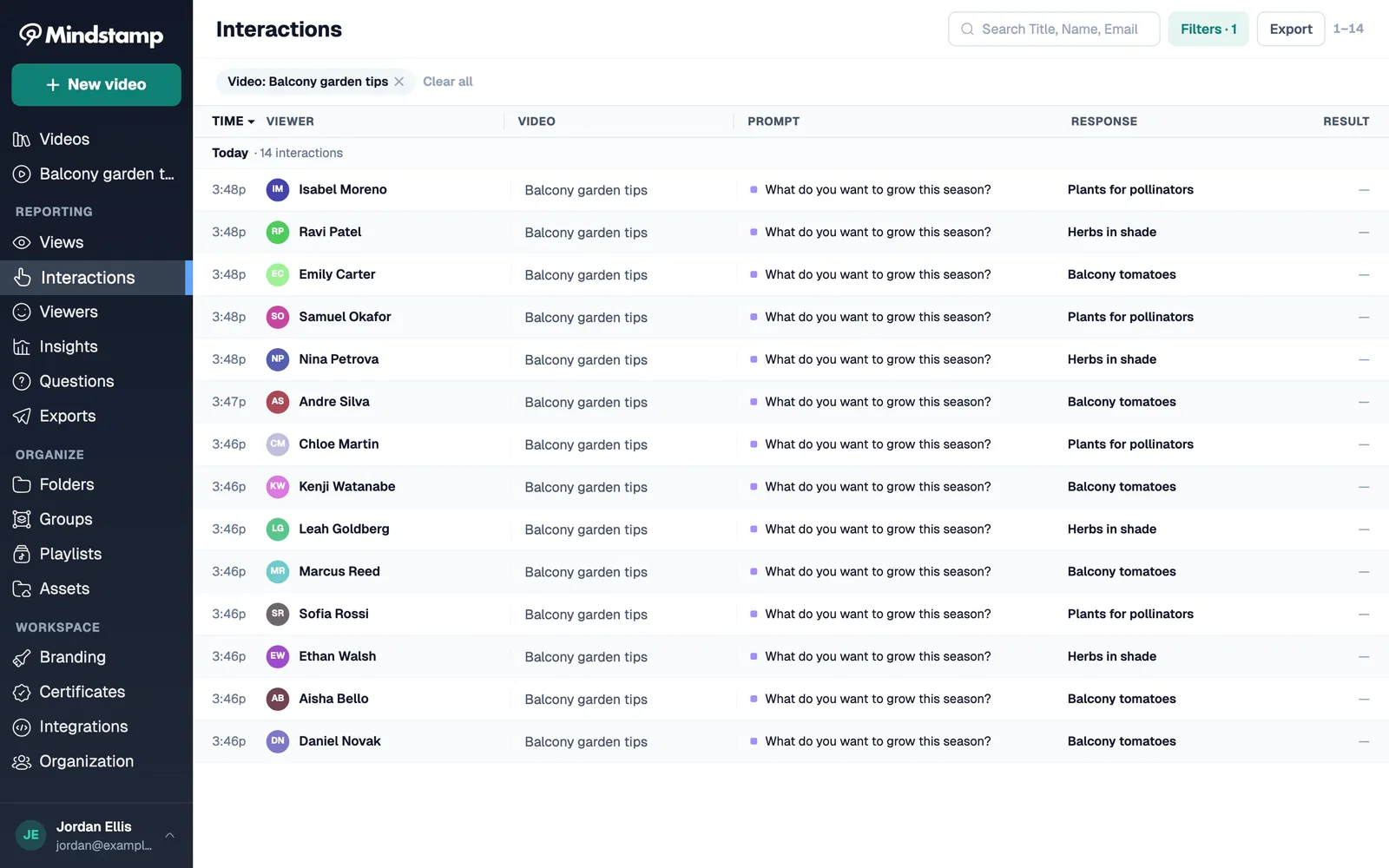
To sort existing subscribers into the same segments, email them a link to the video. A personalized link from your CRM identifies each person, so the form does not ask for details the link already holds, and Mindstamp reports each answer under that subscriber's name. Our guide to putting a video in an email shows how to add a thumbnail that each inbox displays.
Where to share a list-building video
- Blog posts and help articles on the same topic, embedded where the reader is already learning.
- A landing page built around the offer. Our guide to video landing pages covers layout and placement.
- Social posts and video descriptions that link to the Mindstamp share link. Buttons stay in the Mindstamp player, so an upload of the file to YouTube, Instagram, or TikTok does not carry them.
- Event booths and printed material, through a QR code that opens the video.
- Webinar follow-up emails, with the replay as an interactive video.
For more ways to attract subscribers with video, see how video can help you gain email subscribers. If you collect leads for a sales team, our guides to video for lead generation and lead generation best practices cover form placement and follow-up, and how interactive video guides customers through the sales funnel shows where a newsletter fits among the other funnel stages.
How to measure list growth from video
| Metric | How to calculate it | What it tells you |
|---|---|---|
| Offer reach | Views that reached the offer ÷ all views | Whether the offer appears too late |
| Sign-up rate | Sign-ups ÷ views that reached the offer | Whether the offer is worth an email address |
| Confirmation rate | Confirmed subscribers ÷ sign-ups (double opt-in only) | Whether addresses are real and the confirmation email arrives |
| Segment mix | Sign-ups for each interest ÷ all sign-ups | Which topics to make more content about |
| First-email click rate | Clicks ÷ delivered welcome emails, by segment | Whether the welcome email delivers what the video promised |
| 30-day unsubscribe rate | Unsubscribes ÷ new subscribers from the video | Whether the video attracts the people you want on the list |
Exclude your own test views, and change one thing at a time, such as the timing of the offer or its wording. Compare the same measure over a similar number of views after each change.
Common questions
Can you collect email addresses inside a YouTube video?
YouTube's player has no sign-up form for regular uploads, so put a sign-up link in the video description, or embed the list-building version of the video on your own site in a player that supports forms. Mindstamp's marketing pages say YouTube sources are for testing, so for a published campaign, upload the file or connect it from Vimeo or Wistia.
Which email tools can Mindstamp send subscribers to?
HubSpot and Constant Contact connect directly on supported plans. Other email tools receive Mindstamp data through Zapier or a webhook, so check that your tool has a Zapier action that adds a subscriber, or an API that accepts one. The integrations page lists the current options.
Should viewers have to sign up to keep watching?
Only when the rest of the video is the reason they came, such as a full webinar recording or a course. For most list-building videos, turn on Allow skipping in lead capture. Then every subscriber who comes from the video chose to join.
Where should I start?
Choose the video on your site with the most views, add one interest question and one offer, and connect it to your email tool. After a month, compare sign-ups per 1,000 views with your current website form. Mindstamp has a 14-day free trial that needs no payment card, and plans are on the pricing page.