Brett Lindenberg
Update, October 2026: Every feature in this update is still in Mindstamp, and two have changed. Speak Question now offers 13 voices instead of 10. Since late April 2026, a video's Settings can also have Genie AI answers and messages read aloud in 10 of those voices. Genie speaks its answers, but viewers still type their questions, because Genie has no voice input. Start quality changed in September 2026: on phones, or in a browser with data saver on, adaptive videos now start at up to 720p and then move up, so the first frame does not wait on a large download. On desktop, playback still starts at the highest quality. Our accessibility help article covers the spoken voices, and the changelog lists each release since this update.
Happy April!
It's been a while since our last product update. Since launching the redesigned Mindstamp V4 in August, we've continued making the platform faster, more polished, and more capable across the board.
Here are some of the improvements we've rolled out recently.
Voice options
Choose from 13 lifelike voices (10 when we released this) to read questions and answers aloud. Prior versions of this feature relied on the browser voice API, which varied significantly in quality and consistency across viewers. Now, the voice is generated when a question is saved and will be consistent for your audience.
Better default playback quality
Adaptive videos now start in full quality by default. Previously, some browsers and devices started in low quality, leading to fuzziness for the first few frames before achieving high definition. On desktop, videos now start at the highest quality possible and adjust down for slower connections. (Since September 2026, phones and data-saver browsers start at up to 720p, as noted above.)
Folders
Organize your videos more efficiently with folders. You can now create nested folders and move videos between them to keep your workspace organized. Our help article on organizing videos in folders covers subfolders, filters, and what happens when you delete a folder.
Enhanced uploader
Upload videos faster with our new and improved uploader. You can even start watching and editing the videos instantly while the video uploads in the background, so you don't have to wait around to get to work.
Bulk personalization
Upload a spreadsheet as a CSV file and instantly generate personalized viewing links based on the data it contains. Attach each row to a viewer and use each column as a variable in your video, meaning one template video gives every row its own personalized viewing experience. The result can be uploaded into your CRM or database to send the personalized video link out to each contact. You'll find it under Share, then Personalize for a recipient, then Bulk upload CSV; see personalizing video links from your CRM for the column mapping.
Interaction warnings
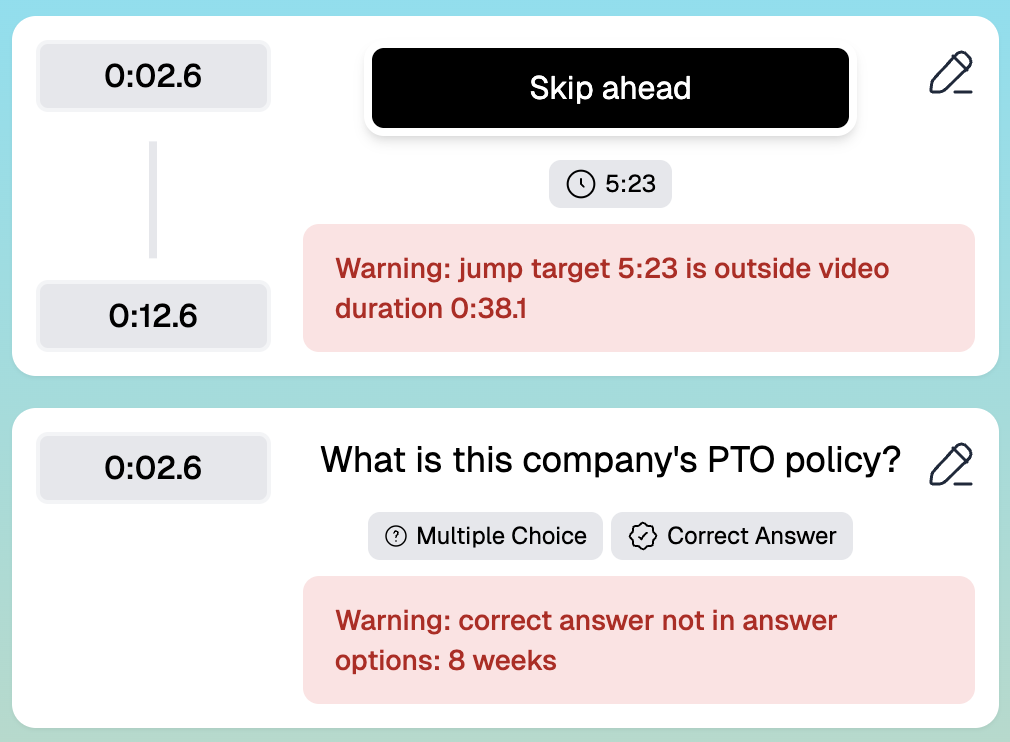
Get notified when an interaction is misconfigured, such as jumping to a time that's not available, branching to a video that's not published, or having a question's correct answer not appear in the answer choices. We've seen this problem come up with users that are copying or importing interactions across videos and running into issues that were hard to find. Now you'll see it right away.
Faster video clip playback
Get near-instant playback of video clips with preloading and new backend optimization so your experiences flow more smoothly.
Increment variables
Build lead-scoring experiences faster with dedicated variable controls to increment and decrement values. Rather than having to type your Mindscript transformations out, such as {{score}} = {{ score+2 }}, you now have Increment +1 and Decrement -1 controls built into the variables UI.
Better AI questions
Create higher-quality, more evenly spaced quiz questions in one click. Longer videos have occasionally run into the issue of poor spacing across the video, which this update addresses. You'll also get step-by-step progress updates so you know how it's progressing. For the full steps, see how to turn any video into a quiz using AI.
Design locking
Lock brand styling for organization users to keep experiences consistent. Organization owners can now “lock” the design that they set so that all organization members must use it and cannot drift from the branding you desire. We've also added two new controls for design management: importing a design from a video, group, or account, and applying a design to one or more videos. Together, these keep your videos consistent and on brand. Our design help article covers each setting.
Unreachable video alerts
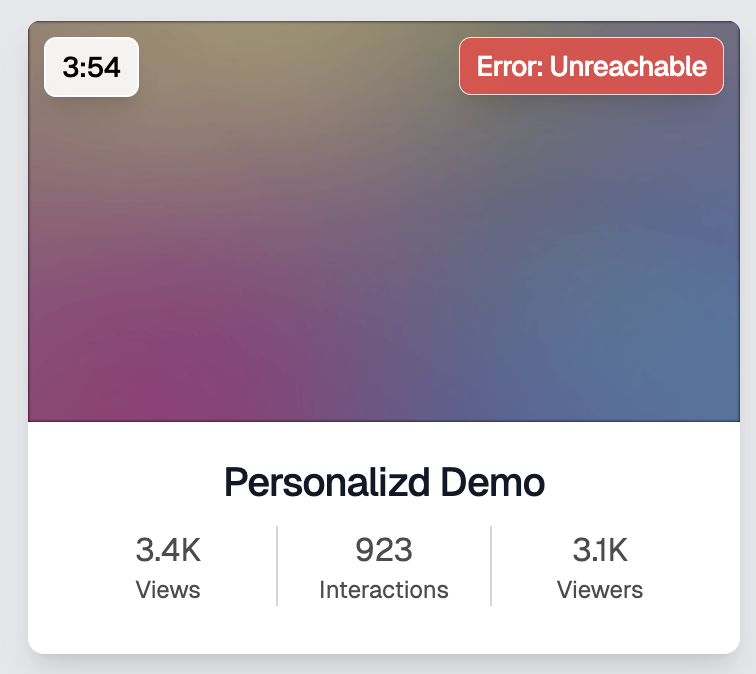
Get notified if your externally hosted video files become unreachable. For customers hosting their video files elsewhere, like S3, Vimeo, or Wistia, sometimes that file would become unreachable and break the Mindstamp experience. Now, you'll see an alert on any video that is having trouble so you can fix it.
Longer video support
Mindstamp now supports videos up to 8 hours long, up from our previous limit of 6 hours. Some plans set a shorter maximum length; see pricing for each plan.
Video library stats download
Export an overview report of activity across your videos to get high-level insight into your library performance.
We hope you enjoy these updates. For what came next, read our May 2026 product update.
Best,
Mindstamp Team