Brett Lindenberg
Video helps you gain email subscribers by showing people what your emails are worth before you ask for an address. A 45-second look at a recent issue, or a how-to clip that offers the next lesson by email, gives a viewer a reason to sign up that a form label cannot. Then put the sign-up where interest is highest: inside the player, while the person is still watching. The demo below shows the pattern at small scale. You pick a gardening guide, see what it covers, and decide whether to get it.
Why video brings in subscribers that a sign-up box misses
A box that says "Subscribe to our newsletter" asks for an email address before the reader knows what arrives in the inbox, so many visitors pass it by. Bryan Haines, writing for The Balance in 2019, discusses opt-in rates on a website and notes that a page built only for sign-ups tends to do better than a box on a busy page. Measure your own opt-in rate before you change anything, so you have a baseline to compare against.
Video improves the ask in four ways:
- It shows the product. Half a minute of scrolling through a real issue tells people more than a sentence about "weekly tips".
- It gives value first. A viewer who just learned something from you has a reason to want the next lesson.
- It reaches people who never see your sign-up form: YouTube viewers, social feeds, webinar audiences, and visitors who scan a QR code that opens a video at an event.
- In an interactive player, the offer can appear inside the video at the moment it is relevant, and the viewer does not have to leave to accept it.
Published figures on the return from email are broad ranges collected from surveys and other reports, and they cannot forecast what your list will earn. HubSpot's guide to email marketing ROI and Snov.io's 2026 roundup of email marketing statistics collect such figures. Track the revenue your own subscribers bring before you put a value on the list.
Six kinds of video that gain email subscribers
Each format below pairs a video with one specific offer. A video that ends with "subscribe for updates" gives viewers little reason to act.
| Video | Where it runs | What the viewer gets by email | Where to ask |
|---|---|---|---|
| Newsletter preview | Sign-up page, social profiles | The newsletter itself | Next to the form, or a button in the video |
| How-to clip | Blog posts, help articles, YouTube | A checklist, template, or the next lessons | Right after the tip, inside the video |
| Video course by email | Landing page, ads | One lesson link per email | On lesson one |
| Webinar or event replay | Follow-up emails, events page | The slides, the next session, or the full replay | At the start, or at the point where the session gets practical |
| Topic choice | Home page, blog | Emails on the topic the viewer picked | After the choice, as in the demo above |
| Social and YouTube clips | YouTube, Instagram, TikTok, LinkedIn | Whatever your sign-up page offers | A link to the sign-up page or to the interactive version |
A preview of the newsletter
Record 30 to 60 seconds of a recent issue: scroll through it, name the sections, and say which day it arrives. Put the clip on the sign-up page beside the form, where it answers the two questions most sign-up boxes skip: what is in the email, and how often it comes.
A how-to clip that offers the next step
Teach one useful step, then offer the rest by email, such as a checklist or a short series. Keep the offer on the video's topic: a viewer who watched a pruning tip wants the pruning calendar more than a general gardening newsletter. Our guide to growing a mailing list with interactive video walks through this build in Mindstamp, including the consent checkbox and the sync to your email tool.
A short video course delivered by email
A five-day course where each email links to one short lesson makes the subscription the delivery method. The sign-up happens on lesson one, and each later email has a clear reason to be opened. Keep the lessons short and end each with a pointer to the next one. A Mindstamp playlist can hold the lessons in order if you also want one page that has all of them.
A webinar or event replay
Replays are content people already want, so a short form before playback is reasonable here. You can also let everyone start watching and ask for an email address at the point where the session turns practical, or offer the slides in exchange for an address. Add chapters so viewers can jump to the part they came for. Our page on webinar replays shows how Mindstamp handles chapters and in-video forms, and our guide to marketing a webinar covers the promotion around it.
A topic choice that sorts new subscribers
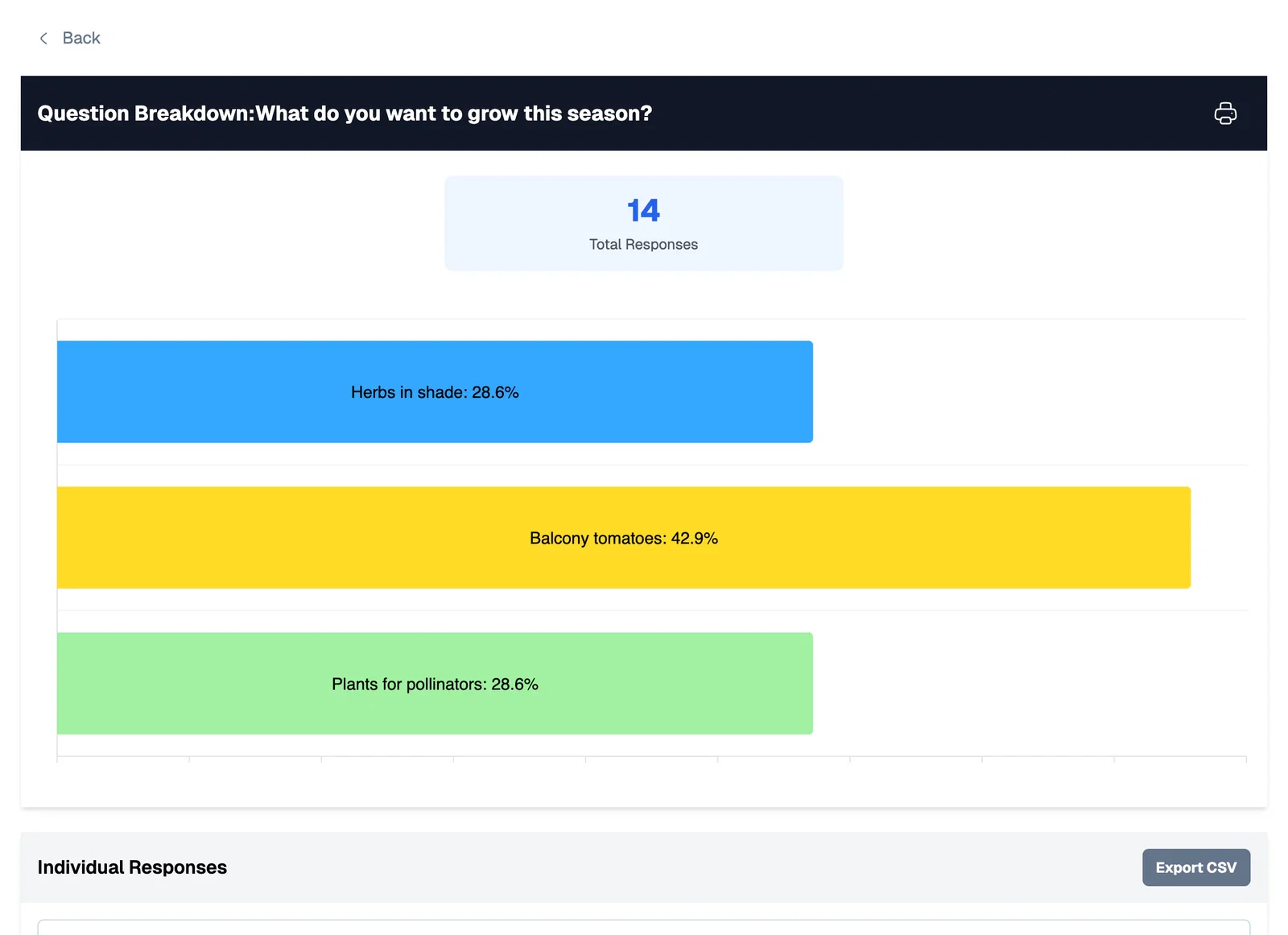
Ask the viewer which topic they care about, show a short scene on that topic, then offer the matching emails. The answer tells you what to send first. In Mindstamp, a button or question can store the choice in a variable on supported plans, and the demo at the top of this page saves the topic this way. To pass the topic to an external sign-up form, turn on Append variables when opening links in the video's settings. Mindstamp then adds the saved variables to every link the video opens, and a hidden field on your form can read them.
The question report also shows how many viewers chose each answer, which tells you which topics to cover in your emails.
Social and YouTube clips that point to the sign-up
Social platforms limit where you can put a link, so plan the route before you post. On YouTube, an end screen can appear in the last 5 to 20 seconds of a video that runs at least 25 seconds, but the Link element to an outside website requires membership in the YouTube Partner Program (checked October 2026). Put the sign-up link in the video description as well. Mindstamp buttons stay in the Mindstamp player and do not travel with a file you upload to YouTube, Instagram, or TikTok, so post a clip natively and link to the interactive version or the sign-up page. Our guide to video marketing for social media covers formats for each network.
Tag each link so you know which clip sent the subscriber. Google's guide to campaign URLs says to always set utm_source, utm_medium, and utm_campaign. A link such as ?utm_source=youtube&utm_medium=video&utm_campaign=pruning-guide lets your analytics tool attribute the sign-up to that video.
When to ask for the email address
Many viewers leave before the end, so an offer that appears only in the last seconds reaches a fraction of the audience. In a 2010 Ad Age column, Matt Cutler shared Visible Measures data on more than 40 million videos under five minutes long: nearly 20% of viewers left within the first 10 seconds, 33% within 30 seconds, and 44% within a minute. Viewing habits have changed since then, but our own data points the same way. Across 8.07 million views of 18,315 Mindstamp videos (2018 to October 2026), the average view played 46.5% of the video.
Choose one of these placements, or combine two:
- A small button that stays on screen for the whole video and opens your sign-up page. Set its Pause to None so it never stops playback, and keep it in a corner away from the controls. The help article on keeping a button visible for the whole video lists the settings.
- A form that appears after the video has delivered something useful. Mindstamp lead capture can show a form at a set time, on the viewer's first click, or only when the viewer clicks the offer you choose. Lead capture is on every plan.
- A form before playback, for replays and courses that people came to watch. Turn on Allow skipping if you want the address to be optional.
- An end screen with a message and a button that opens your sign-up page. The help article on adding a CTA to the end of a video covers the options. Use it as a second ask, because fewer viewers reach the end.
Whichever you choose, say what the subscriber gets and how often. "Get the 12-month pruning calendar, plus one garden tip a week" lets the viewer judge the trade, and "Join our list" does not.
How long should a subscriber video be?
Keep it short enough that most viewers reach the offer. HubSpot's article on ideal video length by platform (updated October 2024) reports that its own YouTube audience engages most with videos just under two minutes, and it gives shorter targets for Instagram, Twitter, and Facebook. Mindstamp platform data by video length is below.
| Video length | Videos | Average watched |
|---|---|---|
| 1 minute or less | 4,952 | 59.4% of the video |
| 1 to 2 minutes | 3,013 | 41.5% of the video |
| 2 to 5 minutes | 3,901 | 39.2% of the video |
| 5 to 10 minutes | 1,554 | 45.8% of the video |
| 10 to 20 minutes | 1,287 | 53.8% of the video |
| More than 20 minutes | 3,608 | 41.7% of the video |
These figures describe Mindstamp customer videos, which are mostly training, marketing, and sales videos. They show a pattern, not a cause, and many factors differ between the groups, such as whether a viewer chose the video or was assigned it. For a newsletter preview or a social clip, aim for a minute or less. In a longer how-to or a replay, put the first offer within the first minute and repeat it later.
Keep the new subscribers on your list
A list built from video only pays off if the emails reach the inbox. NeverBounce's guide to email sender reputation notes that spam reports, low open rates, and high bounce rates all hurt your reputation with mailbox providers, and that bounces often come from rented or bought lists. Subscribers who chose your emails after watching a video are the opposite of a bought list. Keep it that way: add only people who ticked an unticked consent box, and ask for newsletter consent separately from a free guide. Then send the first email soon after the sign-up, make it deliver what the video promised, and keep the schedule the video described. If the preview said weekly, send weekly.
The consent rules differ by country. Our mailing list guide summarizes the UK ICO, US CAN-SPAM, and Gmail sender rules that apply to sign-ups from video.
Measure which videos bring subscribers
Track each video separately, because one good clip can hide two weak ones. For each video, record:
- Views, from your video platform.
- Clicks on the offer. Mindstamp reports show who clicked a button and when, and the viewer report lists each identified viewer with their answers.
- New subscribers, from your email tool, matched by the UTM tags on the sign-up link or by the address the viewer entered in the video.
- Subscribers per 1,000 views, so you can compare a 40-second preview with a 30-minute replay.
When the sign-up happens inside the video, Mindstamp can pass the address and the viewer's answers to your email tool through HubSpot, Zapier, or a webhook on supported plans. Mindstamp sends this data after the viewing session ends, so allow for a short delay before a new subscriber appears. Compare the video's sign-up rate with the rate of the form on your website, and change one thing at a time, such as the offer or its timing.
Common questions
Can a YouTube video help you gain email subscribers?
Yes, through the link in the description and through what you say in the video. Clickable links to your own site in end screens and cards require YouTube Partner Program membership. If you need the sign-up inside the player, embed an interactive version of the video on your own page and link to it from YouTube.
Should you put video in your emails after people subscribe?
Yes, as a linked thumbnail. Email clients cannot play interactive video, so send an image of the video with a play icon and link it to the watch page. Our guide to putting a video in an email shows what works in Gmail, Outlook, and Apple Mail, and the help article on sharing a video in email covers the Mindstamp steps, including personalized links that tell you which subscriber watched.
Should viewers have to subscribe to watch?
Only when the video is the reason they came, such as a full webinar replay or a course. For previews and how-to clips, keep the sign-up optional, because a gate stops people before the video has shown them why they should subscribe.
Does this work for sales leads too?
The same placements work, but a sales lead needs more context than a subscriber, such as company size or a buying timeline. Our guides to video lead generation and lead generation best practices cover qualifying questions and follow-up, and video landing pages covers the page around the video.
Which tools do you need?
You need an email tool and somewhere to host the video. For sign-ups inside the video, add an interactive video platform. Review sites such as GetApp rank video marketing software by user ratings; our note on GetApp's Category Leaders ranking explains what those scores measure.
Start with one video
Pick the video on your site with the most views. Add one offer that continues its topic, place it within the first minute, and tag the sign-up link. After a month, compare subscribers per 1,000 views with your website form. If you want to build the offer inside the video, Mindstamp has a 14-day free trial that needs no payment card, and plans are on the pricing page.