Brett Lindenberg
Audience retention is the share of viewers still watching at each moment of a video. To increase it, find the moment viewers leave and change what is on screen there. Most losses happen in three places: the first 30 seconds, when the opening doesn't deliver what the title promised; the middle, where a section runs slow or doesn't apply to the viewer; and the end, where the video keeps going after its job is done. Some loss is normal: across 8.07 million views of 18,315 Mindstamp videos (2018 to October 2026), the average view played 46.5% of the video.
How to measure audience retention
Your video host draws a retention graph. The horizontal axis is the video's timeline, and the line shows the share of viewers still watching at each point. Two summary numbers come from the same data: average percentage viewed and average view duration.
YouTube Studio adds labels to the graph. Its key moments for audience retention report marks the intro (the share of viewers still watching after the first 30 seconds), top moments where almost no one left, spikes where viewers rewatched or shared, and dips where they skipped or stopped. YouTube marks these moments only on videos at least 60 seconds long with at least 100 views, so give a new video time before you edit it.
In Mindstamp, watched percentage counts the unique seconds a viewer played, divided by the video length, so a viewer who replays the same minute doesn't raise it. Each viewer report shows how far that person got and what they clicked or answered, and drop-off by section is available on supported plans. Our help article on reading Mindstamp reports explains each figure. For the wider set of metrics, such as play rate and completion rate, see our guide to video engagement metrics.
What is a good audience retention rate?
No single number applies. A good rate is one that beats your own videos of similar length, purpose, and audience. Our platform data gives a starting expectation by video length.
| Video length | Average watched | Median video | Viewer actions per view |
|---|---|---|---|
| 1 minute or less | 59.4% | 65% | 0.58 |
| 1 to 2 minutes | 41.5% | 54% | 0.70 |
| 2 to 5 minutes | 39.2% | 50% | 1.16 |
| 5 to 10 minutes | 45.8% | 39% | 3.20 |
| 10 to 20 minutes | 53.8% | 40% | 6.70 |
| More than 20 minutes | 41.7% | 33% | 2.94 |
| All videos | 46.5% | 50% | 2.14 |
"Average watched" weights every view equally, so popular videos count more. "Median video" is the middle video in each group, which shows what a typical video in that length range achieved. The two columns differ most for long videos. Views of 10- to 20-minute videos averaged 53.8% watched, but the median video in that group reached 40%, which suggests the most-viewed long videos held viewers better than the typical one. "Viewer actions" counts answers, clicks, and form entries.
These are mostly training, marketing, and sales videos made by Mindstamp customers, so they are not a benchmark for all online video. Many factors differ between the length groups, including purpose and audience, so use the table as a rough guide for a similar video.
Two outside sources add context. Wistia's 2026 State of Video Report, summarized on HubSpot's marketing blog, found that people watch about halfway through educational videos under five minutes and that webinars hold attention better than most long-form formats. An earlier study of 6.9 million viewing sessions in four edX courses (Guo, Kim, and Rubin, 2014) found that shorter videos were much more engaging and that even high-quality recordings of classroom lectures might not make engaging online videos.
Where viewers leave, and what to fix
The shape of the graph tells you which fix to try first.
| What the graph shows | Usual cause | Try first |
|---|---|---|
| A steep drop in the first 30 seconds | The opening doesn't match the title or thumbnail, or it starts slowly | Fix 1 |
| A steady slide from start to finish with no single dip | The video is longer than the job it does | Fix 2 |
| A sharp dip in the middle | A slow, confusing, or irrelevant section | Fixes 3, 5, and 6 |
| Viewers jump forward and back | They are hunting for one part | Fix 4 |
| A spike | Viewers rewatched a section, out of interest or confusion | Watch that section and decide which; if it confuses, clarify it or add a question (Fix 5) |
| A cliff before the call to action | The ask comes after most viewers have left | Fix 9 |
You can practice this diagnosis in our drop-off diagnosis example, where viewer data points to a problem at 04:20 and you choose what to inspect first.
10 ways to increase video audience retention
1. Make the first 30 seconds match the title and thumbnail
Viewers decide quickly whether a video is the one they wanted. YouTube's help page says a high intro percentage can mean the first 30 seconds matched what the thumbnail and title led viewers to expect, and it suggests testing different openings when that number is low.
Open with the result or the problem. Show the finished dashboard, the fixed error, or the question the video answers, then explain how to get there. Cut the logo animation and the speaker's introduction, or move them after the first useful sentence. If the video has parts, say so in one line ("three steps, about four minutes") so viewers know what they're committing to.
2. Keep the video as long as its job, then split the rest
Give each video one task. If the graph slides down steadily with no single dip, the content is probably fine and the video is too long for what viewers came to do. Split it into separate videos, or keep it whole and add chapters (Fix 4).
Shorter is not always better. In our data, videos of 2 to 5 minutes averaged 39.2% watched, lower than the 53.8% for videos of 10 to 20 minutes. A long video can hold viewers who came for it, such as a webinar recording or required training. Decide length by the task, then check the graph.
3. Edit at the dips
Find the two or three largest dips and watch the 20 seconds before each one. Common causes are a tangent, a slide that the presenter reads aloud, a software demo waiting for a page to load, and a point the video already made. Cut or tighten that section first; it is a smaller job than reshooting the whole video.
Look at the top moments too. YouTube recommends moving your most compelling content earlier when the top moments sit late in the video, because the audience shrinks as the video plays.
4. Add chapters so viewers jump instead of leave
A viewer who wants one part of a 30-minute recording will either find it or close the tab. Chapters give them a way to find it. On YouTube, you add chapters as timestamps in the description: the first must be 00:00, you need at least three, and each chapter must be at least 10 seconds long (YouTube Help). Our free video chapter generator drafts the list from a timestamped transcript and checks those rules.
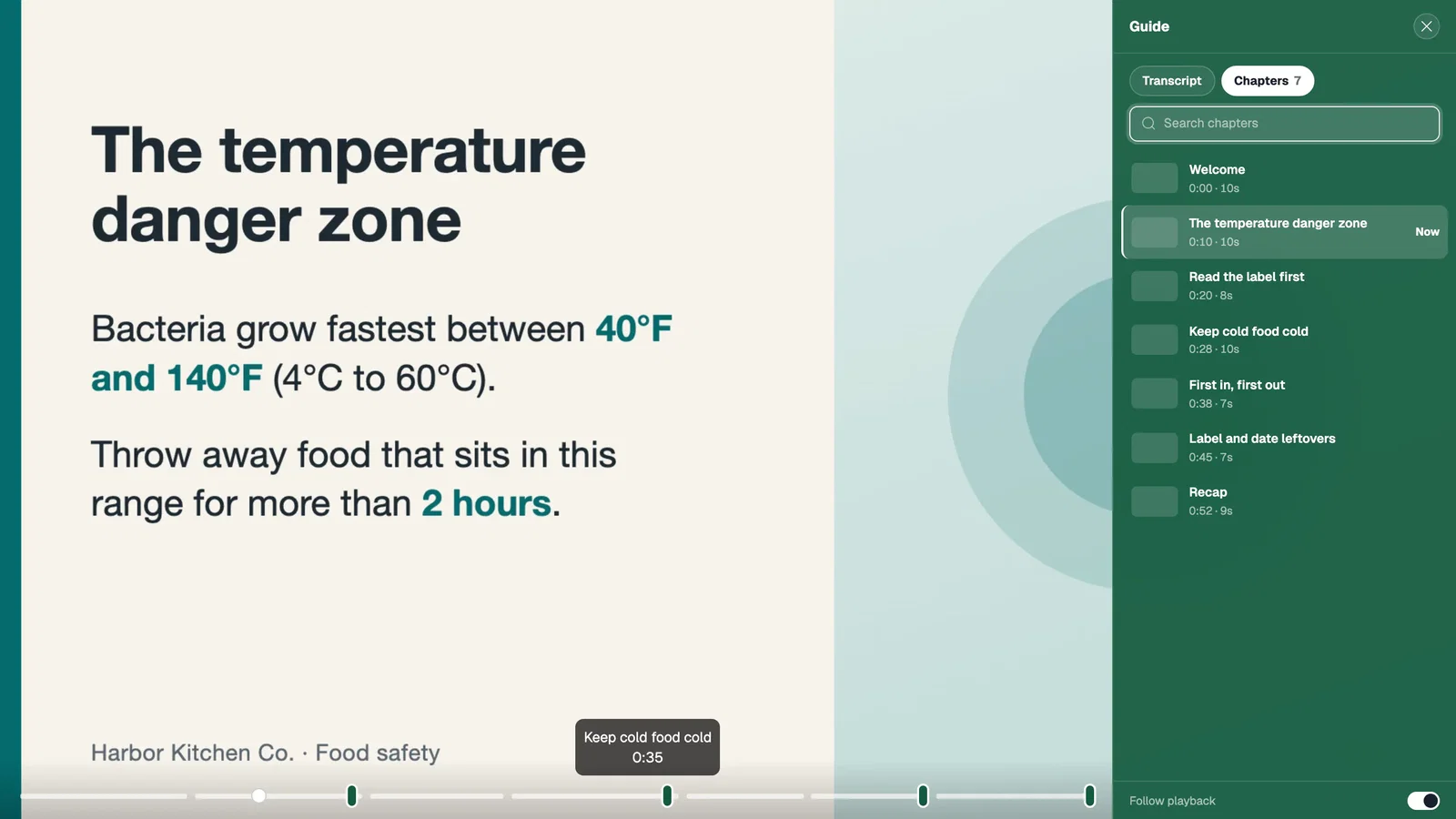
In Mindstamp, chapters are named and searchable, and a transcript lets viewers search for a phrase and jump to the moment it was said. The chapter selector example shows a menu that opens the task a viewer needs.
Chapters can lower your average percentage watched, because viewers skip what they don't need. That is a good result for a reference video. Judge it by whether viewers reach the section they came for.
5. Ask a question before the point where viewers usually leave
A question gives the viewer something to do. In two experiments with online lectures, students who answered memory tests between lecture segments reported less mind wandering, took more notes, and learned more than students who did not take those tests (Szpunar, Khan, and Schacter, 2013). The study used lectures, so it is direct evidence for training and teaching videos and a reasonable hypothesis to test on others.
Put the question just before your usual drop-off point and make it about what the viewer just saw. In Mindstamp, a question pauses the video until the viewer answers or skips, and each answer goes into that viewer's report. You can turn off skipping for questions that must be answered.
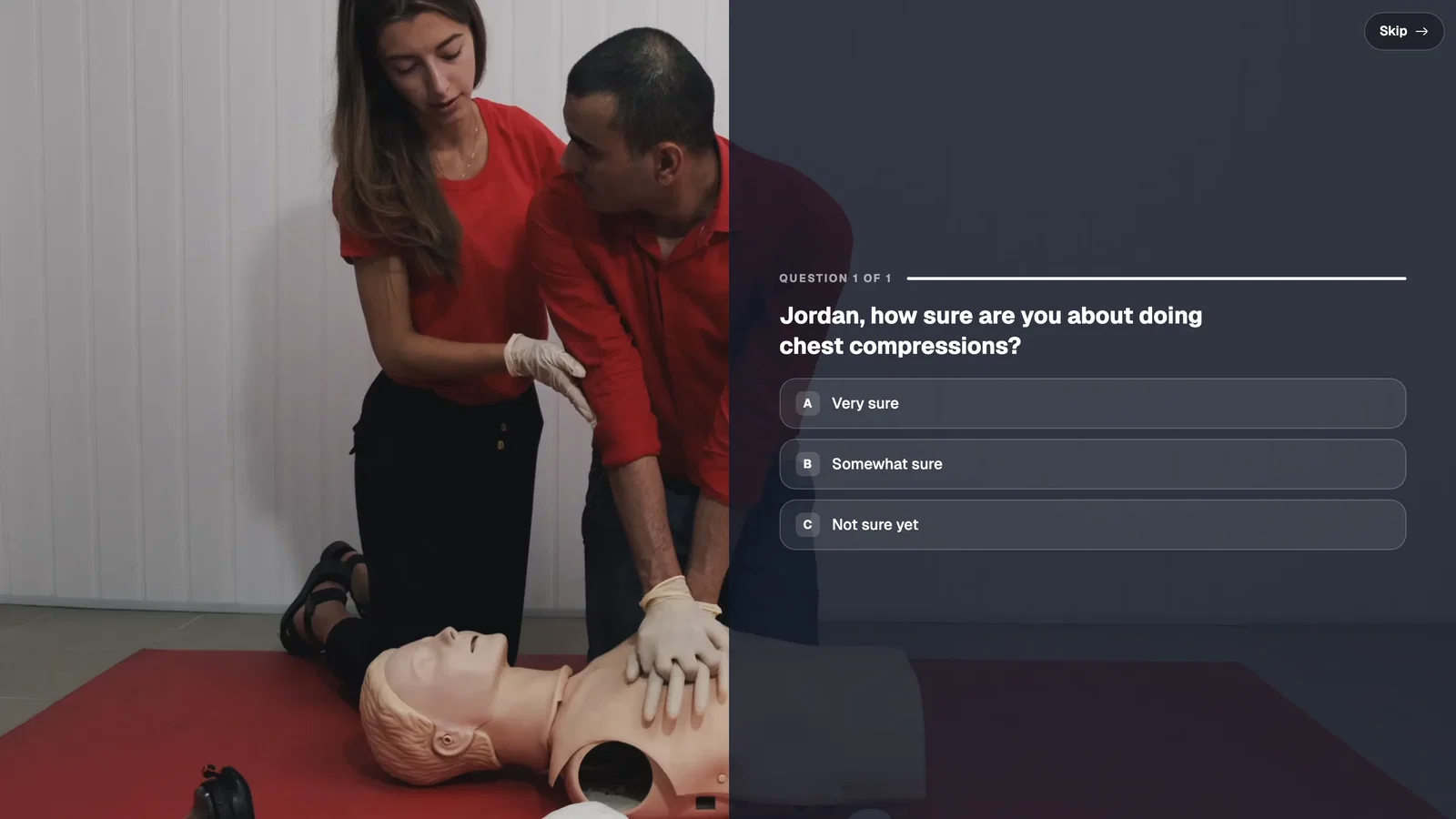
Our own data shows an association only. Videos where viewers took more than three actions per view averaged 51.8% watched, compared with 43.9% for videos where viewers took no action. Many factors differ between these videos, so treat this as a pattern and test it on your own video.
6. Let viewers choose their path
Viewers leave sections that don't apply to them. A choice early in the video, such as "Which plan are you on?" or "What do you want to see first?", lets each viewer skip to their part. With video branching, each answer jumps to a different point or to another video, and the report shows which path each viewer took. The inventory demo by role works this way: you pick your role, and the demo follows the route for that role.
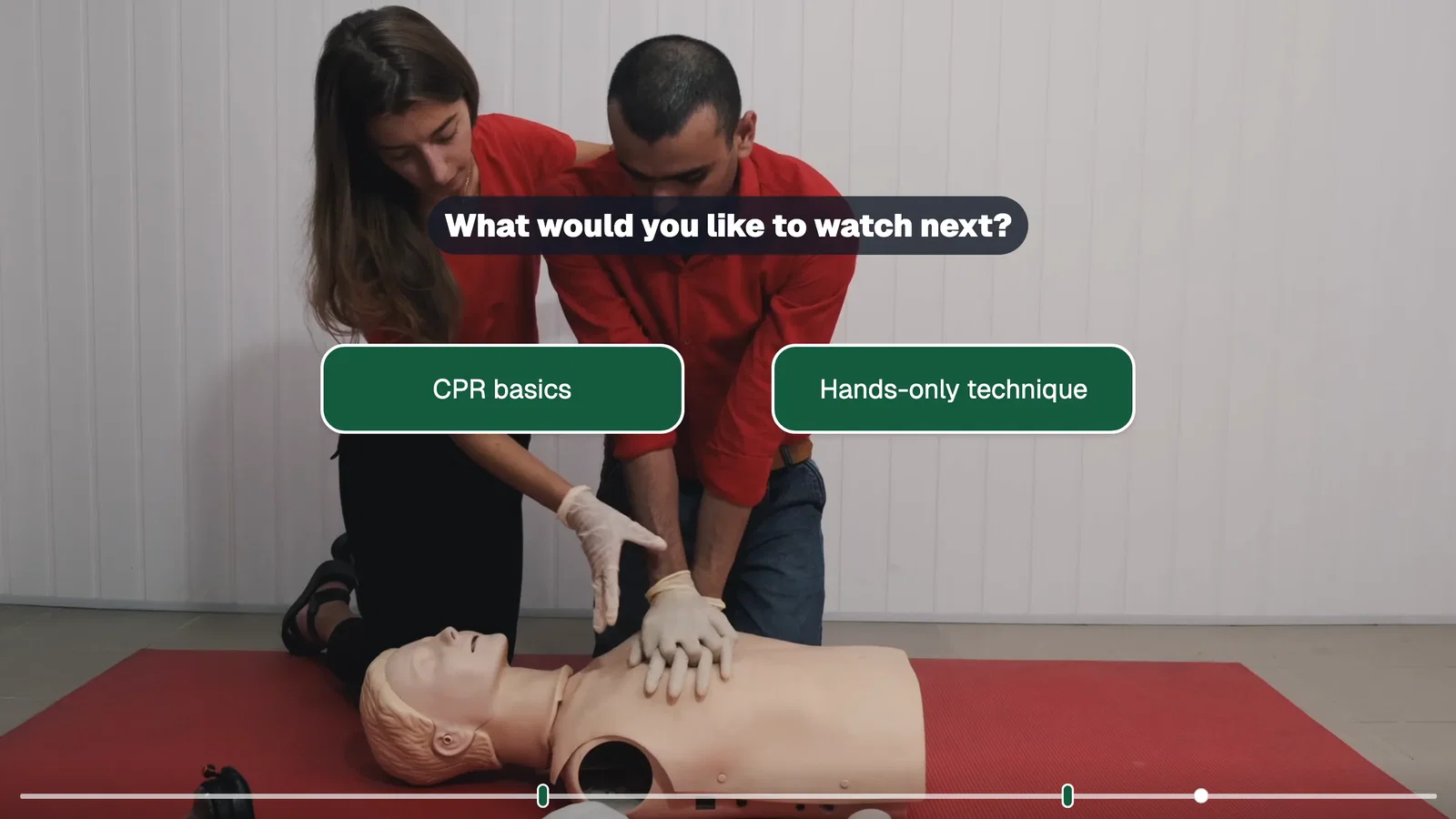
Make the video wait for the choice. In Mindstamp, set the buttons to pause at show time until the viewer clicks, as our pause help article explains. Keep it to two or three choices, and make sure every path ends somewhere useful. For more on planning paths, see our interactive video branching guide.
7. Speak to the viewer by name when a person sent the video
A sales follow-up or an onboarding video that opens with the viewer's name and company shows at once that it was made for them. With personalization, you record one video and Mindstamp fills in details such as name and company when the viewer presses play. The values come from a personalized link or from merge fields in your email tool, as described in our help article on personalizing video links from a CRM (on supported plans).
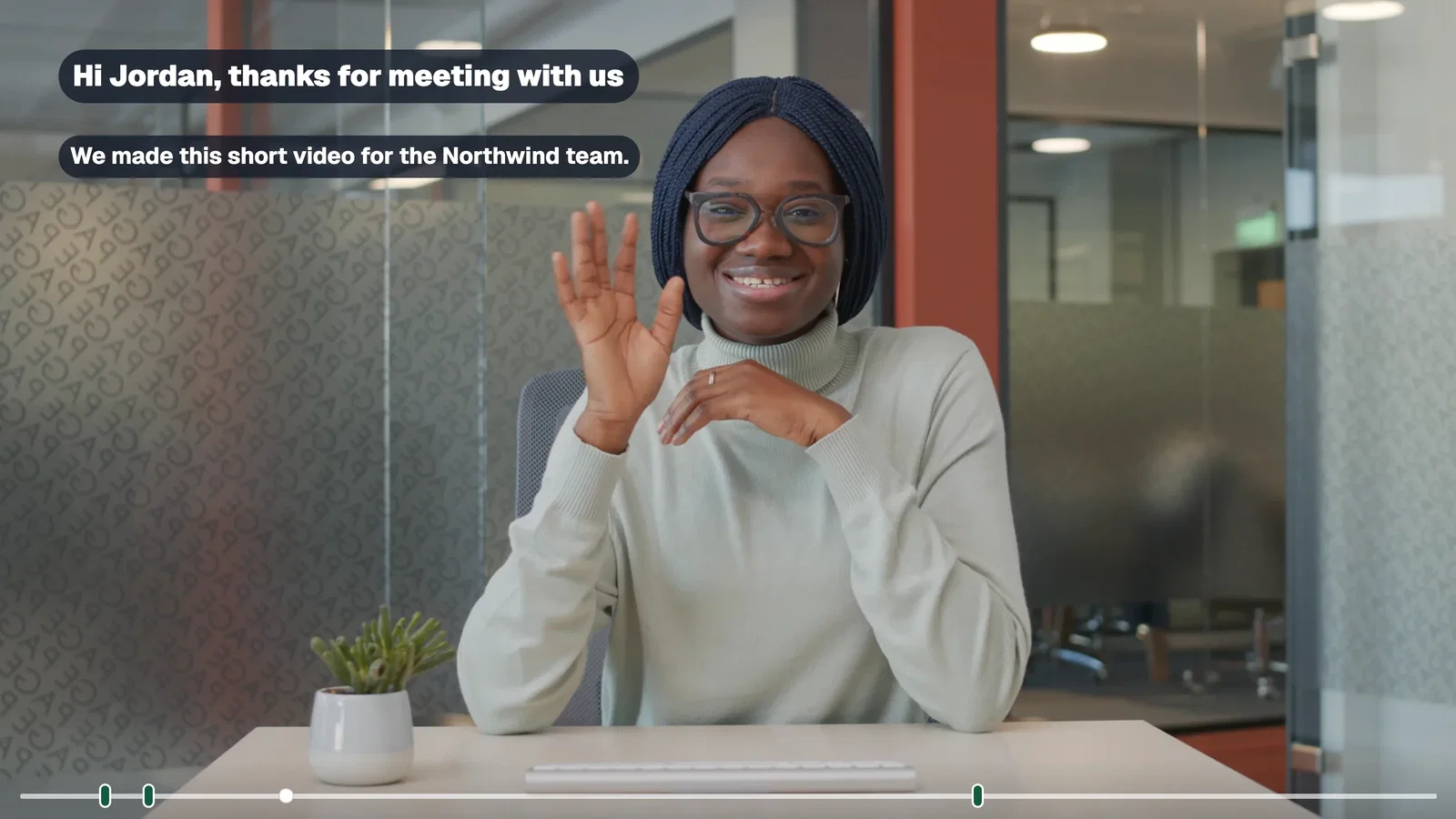
Use it where a real person sent the video. A generic marketing video that greets a stranger by name reads as a mail merge.
8. Add captions for viewers who watch without sound
Viewers who can't or won't turn the sound on leave a video they can't follow. Captions solve that, and they are a requirement for accessibility: WCAG 2.2 success criterion 1.2.2 (Level A) asks for captions on all prerecorded audio in synchronized media (W3C). In Mindstamp you can upload a VTT or SRT file, or create a transcript and Mindstamp adds an English caption track. Set a default track so captions show from the start. See how to add captions.
9. Put the call to action where viewers still are
An end screen only reaches the viewers who get to the end. If your graph shows that most viewers leave after the main point, put the call to action at that point, while they are still watching. Match it to what the viewer just did: after a setup walkthrough, offer the setup guide; after pricing, offer a call. Our end CTA example shows this matching, and our guide on video calls to action covers placement.
If you keep the ask at the end, cut the outro so the end comes sooner. In Mindstamp, you can also add a button a few seconds before the end and pause on the last frame, so the button stays on screen.
10. Bring back the viewers who left
Some viewers leave because a meeting started. Two settings help them return:
- Resume. With Allow resumed views on (supported plans), a returning viewer can choose Resume View or Start Over. Mindstamp keeps resume points for 90 days, as our help article on viewer identity and resume explains.
- Follow-up by how far they got. When you know who the viewer is, the watched percentage can trigger your next message. The HubSpot integration (on supported plans) records each view, with its watched percentage, as an event on the viewer's HubSpot contact, and webhooks send the view record to your own system after the session ends. Send viewers who stopped early the chapter they missed, and send viewers who finished the next step.
Both depend on knowing the viewer, so use lead capture or a personalized link when the follow-up matters. If the video's job is to generate leads, our interactive video marketing strategy guide covers how to plan that follow-up.
Common questions about video audience retention
Do viewers really retain 95% of a message from video and 10% from text?
We can't trace that claim to a study. It appears in older roundups such as Biteable's 2021 video marketing statistics, which credits Insivia's statistics page. That Insivia address now redirects to a 2025 list that doesn't include the claim, and neither page names the research behind it. Leave untraceable numbers out of your planning, and measure recall in your own video with a question.
How do I keep viewers watching a promo video or ad?
Assume you have about five seconds. On YouTube, viewers can skip a skippable in-stream ad after 5 seconds, and bumper ads last 6 seconds or less (Google Ads Help). Google's advice for conversion-focused video ads is to hold attention in the first 5 to 10 seconds with a problem statement and show how your product solves it, then repeat the call to action in the voiceover or on screen. For promo videos on your own site, show the product in use in the opening seconds and put the offer before the halfway point.
Can videos reduce support tickets?
Many teams report that they do. In Wyzowl's 2026 video marketing survey of 266 respondents, 57% of video marketers said video had helped them reduce support queries. This is self-reported. For support videos, judge retention differently: a viewer who leaves after 40 seconds with the answer is a success. Put the answer near the start, and let viewers pick their plan or platform so they skip the steps that don't apply. Our customer support use case shows that pattern.
Is audience retention the same as engagement?
Retention is one part of engagement. It tells you how much of the video people watched and where they stopped. Engagement also covers what they did: plays, clicks, answers, and shares. A video can hold viewers to the end and still produce no clicks, so track both. Our video engagement metrics guide covers the full set.
Does adding interactions always increase retention?
No. Our platform data shows an association only, and a question can become one more place to leave if it feels like a test the viewer didn't sign up for. Add one interaction at your largest dip, compare the next 100 views with the previous 100 (the same minimum YouTube sets before it marks dips in its key moments report), and keep the change if the graph improves. For how interaction fits a wider plan, see our guides to interactive video marketing and video marketing strategy.
Start with your most-watched video. Open its retention graph, find the largest dip, and change that one section. After the next 100 views, compare the new graph with the old one, then move on to the next dip.